
Field guide · 2026-10-18
PDF to Word on Mac Without Losing Tables
Open a PDF in Word and Word tells you what it is about to do. It will make a copy of the file and convert the contents into something it can display, and the original stays untouched. That message is honest. It is also where the pdf to word mac tables problem begins, because Word converts for prose, and a table is not prose.
Microsoft's own page on editing a PDF in Word says the conversion works best with PDFs that are mostly text. It adds that the result might not match the original page for page. It does not mention tables at all.
Here is why tables are the weak spot. A PDF has no table in it. It stores short runs of text, each at a position on the page. The rows and columns you see are your eye joining runs that line up. Prose needs only the order of the lines, and a converter can recover that order. A table needs the alignment between lines too, and that has to be inferred from distances on the page. Word is built for prose, and tables usually come out mangled.
If your PDF is a letter or an essay, use Word's import. It costs nothing and it is right there. If the page has a table you need to keep, I would not.
A quick test settles which side your file is on. Look at the PDF before you choose. If it is paragraphs from top to bottom, take Word's route. If you see a grid, or columns of figures lined up under headings, take a route that reads positions. A statement, a price list, a results page and an annual report note all fall in the second group.
PDFTrail is my app. It builds the Word file from the geometry of the text instead: which fragments share a row, where the column boundaries fall. Rows and columns come out intact in the .docx. This guide is about tables, so I make no claim about fonts or page design in the file. Check those yourself.
The pdf to word mac tables steps
- Click Open PDF and select the file in the dialog. To convert several files, select them together.
- In the sidebar, tick Word Document (.docx) under the output formats and press Convert.
- When the run ends, look at the tables. If a page needs attention, Table Review opens without being asked. At other times, press the toolbar's Review tables button.
- If a table is wrong, open the grid editor on that page. Reposition the grid lines, add lines where cells ran together, or draw the table region. Try the grid, then save the fix.
- Press Accept and re-export. The .docx is written again with your fix, and no free export is used.
- Open the .docx in Word.
Ten Word exports are free. After those, Word export stops until you unlock the full version, which costs $24 once. There is no subscription and no account.
You may also open the files as they are. For a document you are about to send to someone, I would not skip the tables.
The app keeps a saved fix for that PDF and reapplies it on the next conversion of the file. That helps when a report comes round every month in the same shape. If you want a clean start, you can tell the app to ignore saved fixes.
Tables that run across pages
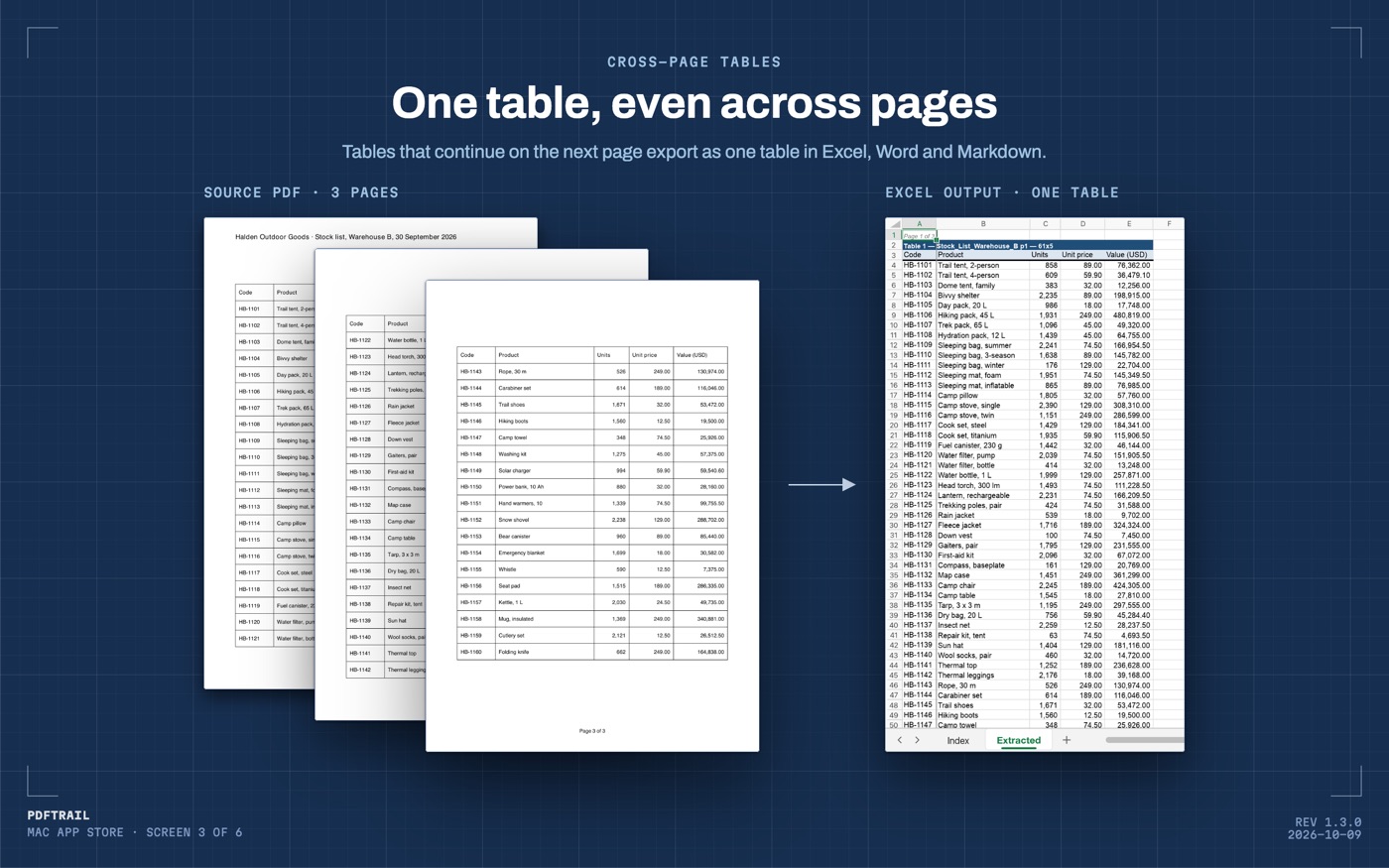
A long table does not stay on one page, and that is where a hand conversion breaks. Version 1.3.0 stitches a table that runs on to the next page into a single table in the Word file, with one header row. If the break split a row, that row is whole again.
Why does that matter in Word? In a Word file, a table that restarts on every page is a different table each time. You cannot sort it as one block or select a column across the break. A single joined table can be read and edited as one table.
What I check in the .docx
A file that opens is not a file that is right. In testing, I ran a scanned loan application, 174 pages long, from an Indian public-sector bank into Word and Markdown. Then I checked the key identification numbers by hand, page by page.
For a table, the same habit is smaller. Open the longest table first. Count the columns against the printed page. Then look at the header. A joined table should show it once, at the top, not again in the middle.
Read the first and last row of each page against the PDF. A missing row is most likely at a page break, so that is where I look.
Then compare the figures. Pick a handful of numbers from different tables and check each against the source. That is the check that finds a digit that went wrong.
If the PDF is a scan, the pages hold pixels, so OCR runs on the Mac before the tables are built. OCR is good but not infallible. The guide to scanned PDFs goes further into what it can and cannot recover.
For the spreadsheet version of this job, the PDF to Excel guide is the place to start, and how table extraction works explains the mechanism under both.
Back to Word's message
Word's message says it will convert. For prose, that is fine. For a table, you want something that reads the positions instead of guessing from them.
Open the .docx and look at the table before you send it. A look with the page beside the file is cheaper than a reply asking which column the second number belongs to.
FAQ
Why does Word mangle tables when it opens a PDF?
Word converts a PDF for editing, and it is built for prose. A PDF stores positioned text fragments, not tables, so Word has to guess the columns, and the guess usually fails on tables.
Does PDFTrail keep a table that runs across pages as one table in Word?
Yes. In version 1.3.0, when a table continues on the next page, PDFTrail joins the pieces into one table in the Word file, with one header row.
Can I convert a scanned PDF to Word with tables?
Yes. A scan has no text layer, so PDFTrail runs OCR on your Mac. OCR is good but not infallible, so check the tables in Table Review after conversion.
How many Word exports are free?
Ten. PDFTrail is free to try, with 10 free Word exports. After those, Word export stops until you unlock the full version, a $24 one-time purchase with no subscription.
Does the conversion need the internet?
No. Everything runs on your Mac. Nothing is uploaded, and there is no account.
Related guides
- PDF to Excel on Mac: The Complete Guide (2026)
- How to Convert a Bank Statement PDF to Excel on Mac
- SBI Bank Statement PDF to Excel on Mac
- HDFC Bank Statement PDF to Excel on Mac
- ICICI Bank Statement PDF to Excel on Mac
Get PDFTrail
PDFTrail is on the Mac App Store — download it, try it on your own file, and pay only if it earns its keep.
GET PDFTRAIL — MAC APP STORE