
Field guide · 2026-09-19
PDF to Excel on Mac: The Complete Guide (2026)
When PDFTrail first went up on r/macapps, the questions that came back were not about features. People asked what the app does when it fails: an invoice with a layout nobody planned for, a page it can't read at all. The answer the app gives is Table Review, where each detected table sits beside its page after the conversion, so a page it struggles with is visible to you rather than hidden.
That is the honest way to think about getting a PDF to Excel on a Mac. Which app has the most buttons matters less than what happens on the page that is hard, and every route you might take answers that differently.
What each route does when the page is hard
Start with Preview, since it is already open. Select the text on a page and paste it into Excel, and the paste itself is instant, no failure at all. The failure shows up after: a bank statement's rows and columns land in one long cell, because Preview never had a table to copy, only text at positions on a page. A short list survives this. A real table does not.
Word does better on the easy case and worse on the exact page you're worried about. Open a PDF in Word and it tries to rebuild the document as prose, which works fine for paragraphs. Give it a table with a merged header or a multi-line cell, and the layout it guesses at often comes out sideways or split across the wrong columns. It is built to read a letter, not to preserve a grid.
Excel itself would be the obvious next stop, except the button you're looking for isn't there. On Windows, Power Query has a From PDF import that pulls a table straight out of a file. Excel for Mac does not ship that feature, a gap confirmed on Microsoft's own support forum in response to someone asking exactly this (learn.microsoft.com). The search for that menu item on a Mac always ends the same way.
Tabula and the Python libraries, camelot and pdfplumber, handle the hard page by asking you to describe it. You mark the table region, or tune the extraction settings, and get a result you can inspect in code before you trust it. That control is real, but it comes with Java for Tabula, or a Python environment and some scripting for the others. Neither one tells you, on its own, when a page it read is actually wrong.
Upload sites answer the hard-page question by moving the problem off your machine. You send the file, a server somewhere does the extraction, and you get a spreadsheet back. That is a fine trade for a document nobody would mind a stranger seeing, a public report or a spec sheet. It is a worse trade for anything with an account number or a client's numbers on it, since the file now sits on infrastructure you can't see.
An on-device app is the last stop, and the one built around the hard-page question directly rather than around avoiding it. PDFTrail is my app, so read the next part knowing that. It converts a PDF to Excel, Word, Markdown, JSON, or plain text, and it does the read on your Mac. Nothing goes to a server. For a page it cannot read cleanly, Table Review opens by itself once the conversion is done. That is the same complaint that started the r/macapps thread, answered the way people actually asked for it.
What a PDF contains, and why this all follows from it
None of this is really about apps. It is about what a PDF is. A PDF stores no rows and no columns. A born-digital file, the kind your bank or accounting software exports, stores short runs of text, each pinned to an exact position on the page. A scanned file, a photocopy or a phone photo saved as PDF, stores no text at all, only pixels. Every tool above is really answering one question: given fragments of text or a flat image, how does it decide which pieces belong to the same row?
Preview doesn't try. Word tries, for prose. Tabula and the Python tools let a person try, with code. An upload site tries somewhere you can't watch. PDFTrail works out which fragments share a row and where the column boundaries fall, from the geometry on the page. For a scan it runs OCR on the Mac first, since there is no text there to begin with.
PDF to Excel on a Mac, step by step
- Click Open PDF and choose the PDF. For a whole folder, open it in the dialog and select all the PDFs in it.
- Let it read the file. A born-digital PDF is read directly, character by character, with no OCR involved.
- For a scanned page, OCR runs on your Mac before anything else happens.
- After the conversion, check the detected tables in Table Review. A page that was partly read or not read opens it by itself; the Review tables button in the toolbar opens it at any other time. Check the row count and that dates and amounts sit in the right columns.
- Open the .xlsx file the conversion wrote. If you fixed a table in the grid editor, click Accept and re-export first.
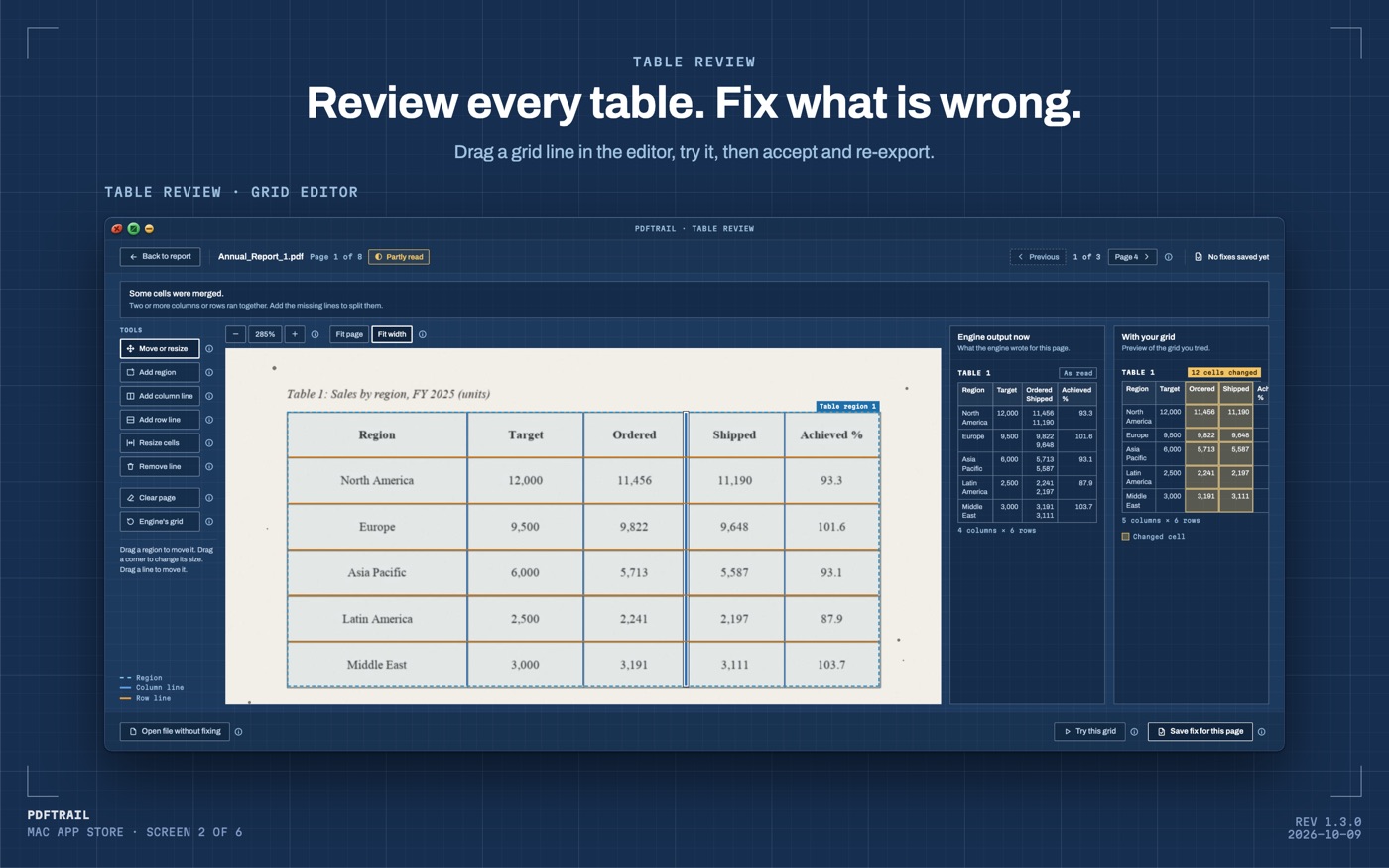
Skipping the review step costs nothing, right up until it does. It is the one place you catch a misread digit or a table the app got wrong, on screen, before it becomes a number in a spreadsheet someone acts on. You compare the detected rows against the source page yourself.
Back to the thread
Nobody on that thread asked for a faster export or a prettier icon. They asked what the app does when a page fights back, and the honest answer used to be that it just failed quietly. Now Table Review puts the detected table beside that page once the conversion is done, and you decide what to do next. That's a smaller promise than "it works on everything." It's also the one that holds up on the page you actually have trouble with.
If your file is a bank statement, the bank statement guide covers that document specifically, and the 1.2 release notes cover what changed in version 1.2. If your files are rough scans rather than clean downloads, how the engine handles bad scans goes into what OCR is actually doing behind that review screen.
Try the route that matches your file, and look hard at the page it struggles with. That page is the real answer to the question people keep asking.
FAQ
Why doesn't Excel for Mac open a PDF as a table?
Excel for Mac has no From PDF connector. That Power Query feature is Windows-only, according to Microsoft's own answer on the question.
Can I copy and paste from a PDF into Excel?
You can try. A PDF stores text as positioned fragments, not rows and columns, so Preview's copy-paste usually runs a table into one line.
Is it safe to use a free online PDF to Excel converter?
It depends on the file. An online converter needs your document on its server, a fair trade for a public file and a poor one for a bank statement or payslip.
Does PDFTrail need an internet connection?
No. It runs entirely on your Mac. Nothing is uploaded, and there is no sign-up.
What happens with a scanned PDF that has no text layer?
PDFTrail runs OCR on your Mac, and Table Review shows the table it found next to the source page, so you can check it before you rely on the file.
How much does PDFTrail cost?
It's free to try, with 10 free exports per format for Excel, Word, and Markdown. The full version is a $24 one-time unlock, no subscription.
Related guides
- How to Convert a Bank Statement PDF to Excel on Mac
- SBI Bank Statement PDF to Excel on Mac
- HDFC Bank Statement PDF to Excel on Mac
- ICICI Bank Statement PDF to Excel on Mac
- GST Invoice PDF to Excel on Mac: Batch Convert
Get PDFTrail
PDFTrail is on the Mac App Store — download it, try it on your own file, and pay only if it earns its keep.
GET PDFTRAIL — MAC APP STORE