
Field guide · 2026-09-24
SBI Bank Statement PDF to Excel on Mac
Page 15 is the one I keep coming back to. It is a bank statement, printed on a dot-matrix printer, spiral bound, and scanned slightly crooked, and the coil of the binding lies right across the middle of the text. It sat inside a 174-page loan application from an Indian public-sector bank. I wanted the transactions in a spreadsheet. The scan wanted nothing to do with me, and neither did any converter I tried on it.
Your SBI statement is almost certainly nicer than that. If you downloaded it from online banking, it is a born-digital PDF, and getting an SBI bank statement PDF to Excel is a short job once you know what the file is. If a branch printed it and someone scanned it, you are closer to my page 15, and the job is still doable. It just needs one extra look.
What an SBI statement PDF actually contains
Here is the thing nobody tells you. A PDF has no table in it. It has short runs of text, each pinned to coordinates: this date at this x and y, this amount a little to the right. The rows you see are an optical effect of good alignment. So when you select the whole page in Preview and paste it into Excel, Excel receives a stream of fragments with no idea which ones belonged together, and it does the only thing it can. One long line.
Retyping avoids that, at the cost of an evening and a transposed digit you find in March.
The converter sites that top the search results avoid it too, at a different cost. They need the file first. I wouldn't send a document with my account number and a year of my spending to a server I can't name, and I don't think you should either. Excel for Mac can't help, by the way. The "From PDF" import that Windows users get in Power Query was never built for the Mac, as Microsoft's own answers forum confirms. People keep looking for that button anyway.
PDFTrail is my app. I built it to read Indian annual reports into a language model without uploading them, and a bank statement turned out to be the same problem in a smaller envelope. It reads the text runs and their positions straight out of the file, works out which runs sit on one line and where the columns break, and writes the rows to your files. Then it shows them to you next to the page. Nothing leaves the Mac. There's no account, and it works with Wi-Fi off.
The four steps, SBI bank statement PDF to Excel
- Click Open PDF and choose the statement PDF.
- Wait for the read. A downloaded statement has a text layer, so the text is read directly, no OCR. A scanned one has only pixels, so OCR runs on the Mac first.
- Look at Table Review. It opens by itself if a page needs a look; at any other time, click Review tables in the toolbar. Check that dates sit in the date column and amounts in the amount column. Count the rows against the printed statement.
- Open the .xlsx. If you changed a table, click Accept and re-export first.
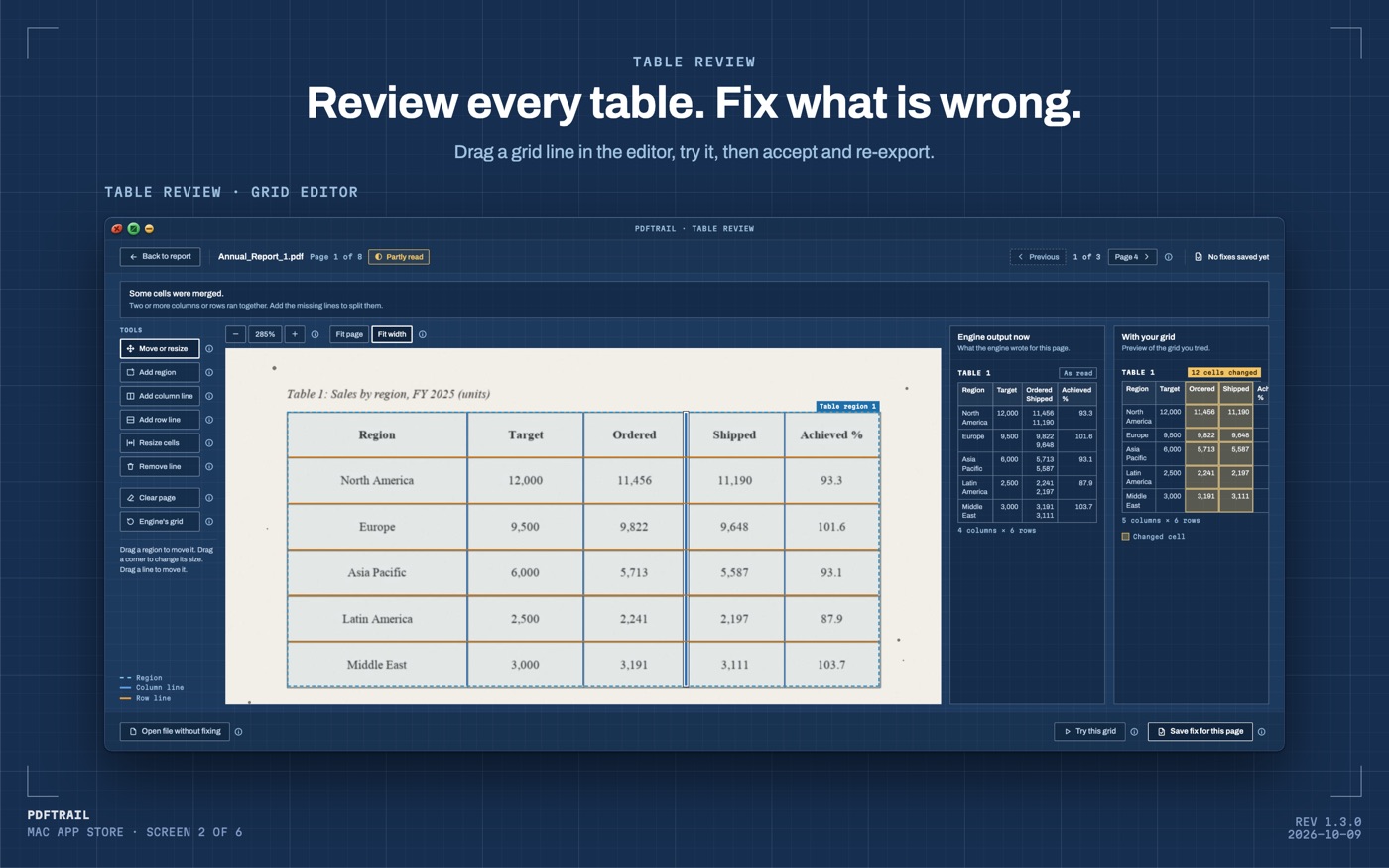
For twelve months of statements, select all twelve PDFs in the Open dialog instead of one file. Batch conversion runs the lot, one Excel file per statement, and you check each one in Table Review. For one workbook instead, turn on "Combine into one file per format" before you convert. The review is the part I'd never automate away, because it's the only moment you're looking at the numbers with the source page next to them.
The two checks I never skip
The first is the row count. If the statement shows 87 transactions and the sheet has 84, something was missed. Start at the page breaks. Open Table Review and compare the last rows of each page with the statement. PDFTrail joins a table that continues on the next page, and a row cut by the page break becomes one row again, so that join is where to look.
The second is the balance column. Walk down it. Each balance should equal the one above it, plus the credit or minus the debit on that row. Where that chain breaks, you've found either a misread digit or a missing row, and you've found it in ten seconds instead of at tax time.
I can't tell you the exact column order of your statement, because layouts differ, and I don't have yours in front of me. Date, narration, debit, credit, balance is the usual shape. Some add a reference number. The review screen exists so you check your file, not my description of it.
Back to page 15
The coil across the text beat the engine. It found no usable table on that page, and it said so, which is the correct answer. A fabricated table is worse than a missed one, and it took 26 invented tables on pure scanner noise, early on, to make that rule stick. The rest of the form went through without me.
Your SBI statement will not have a spiral coil across it. It'll take the four steps, and then the two checks, and then it's a spreadsheet you can pivot by month or hand to whoever asked. If you have statements from other banks in the same folder, the general bank statement guide covers the differences, and the PDF to Excel guide is the wider map.
Check the balances anyway. It's your money, and it takes ten seconds.
FAQ
Does this work with a scanned SBI statement?
Yes. Scanned pages have no text layer, so PDFTrail runs OCR on your Mac, and Table Review shows the table next to the page for you to check.
Do I need an internet connection?
No. Everything runs on your Mac. Nothing leaves the device.
How much does it cost?
It is free to try, with 10 free Excel exports. The full version is a $24 one-time unlock, no subscription.
Why not just email the PDF to my accountant?
You can, but that only moves the file. Whoever opens it still needs to pull the transactions into a spreadsheet before they can total or sort them.
What if the export has fewer rows than my statement?
Open Table Review with the Review tables button and compare it with the statement page by page. Start at the page breaks, where PDFTrail joins a table that continues on the next page.
Related guides
- PDF to Excel on Mac: The Complete Guide (2026)
- How to Convert a Bank Statement PDF to Excel on Mac
- HDFC Bank Statement PDF to Excel on Mac
- ICICI Bank Statement PDF to Excel on Mac
- GST Invoice PDF to Excel on Mac: Batch Convert
Get PDFTrail
PDFTrail is on the Mac App Store — download it, try it on your own file, and pay only if it earns its keep.
GET PDFTRAIL — MAC APP STORE