
Field guide · 2026-09-28
ICICI Bank Statement PDF to Excel on Mac
Suppose your accountant asks for the quarter's transactions as a file they can import, not a PDF they have to squint at. What they actually want is an Excel sheet with the narration text still readable and the debit and credit amounts sitting in the columns they belong in. Converting an ICICI bank statement PDF to Excel is exactly that job, and your current account produces the raw material for it every month, whether you're ready for it or not.
That someone turning the PDF into rows is usually you, and the obvious routes make it worse. Select the statement in Preview, copy, paste into a spreadsheet, and watch the date, the narration, and the amount land in one cell together. A PDF does not store a table. It stores short pieces of text, each one placed at a position on the page, and a table is what your eye sees when those positions line up. Preview cannot recover the columns, because there were never columns to begin with, only coordinates.
Retyping the quarter avoids that failure and invites a different one: a transposed digit in a narration you copied by hand at nine at night. An online converter avoids both, for a price you don't see until later. It needs the file first, and a current-account statement lists every party you paid and everyone who paid you. I wouldn't hand that to a server I can't name, and your accountant would agree.
What an ICICI bank statement PDF actually contains
Layouts differ by bank and by account type, and they change over time, so I won't describe ICICI's columns specifically. What holds across nearly every current-account statement is a narration field, a date, and a pair of amount columns, one for money out and one for money in, next to a running balance. Some statements add a reference number or a value date; some fold the two amount columns into one signed figure. The review screen is where you confirm which shape your own file uses.
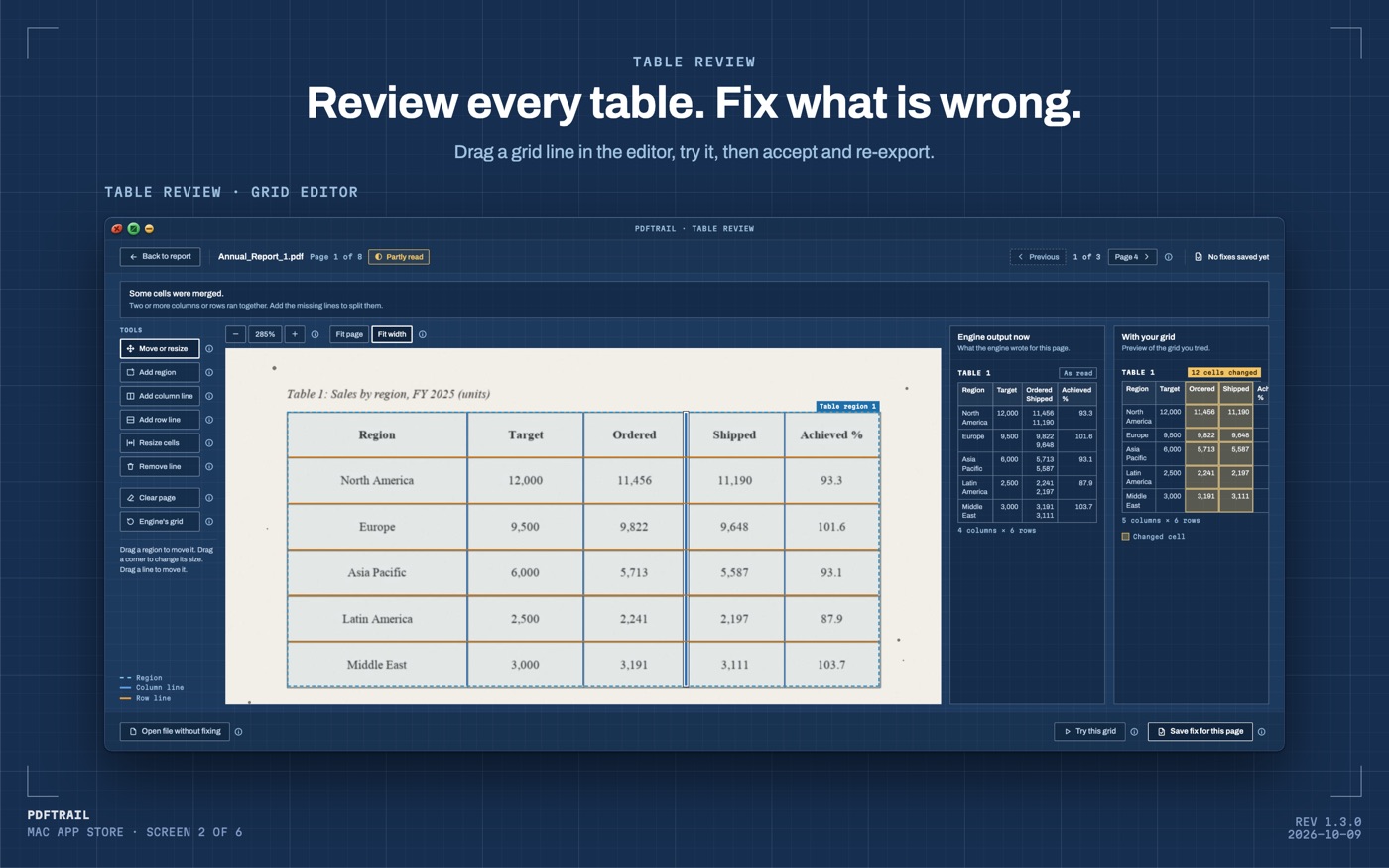
PDFTrail reads the text and its position straight out of the file for a downloaded statement, no OCR involved, and works out which fragments share a row and where the column edges fall. A scanned copy has no text to read, so OCR runs on the Mac first. After the conversion, Table Review shows each table next to its page, and you can check it before you rely on the file. Nothing about the file leaves the machine at any point in that process.
PDFTrail is my app. I built it after refusing to upload my own financial documents to services I could not vouch for, and a business current account is the same refusal with higher stakes attached. The accountant asking for clean data doesn't need to know how it got clean, only that it did.
Converting an ICICI bank statement PDF to Excel, step by step
- Click "Open PDF" and choose the ICICI PDF.
- Let it read the file. A downloaded statement has a text layer already; a scan gets OCR on the Mac.
- Open Table Review. It opens without a click when a page needs a look; the "Review tables" button covers every other case. Confirm the narration text is whole in each row, not cut short, and that debit and credit figures sit in the columns they should.
- Open the Excel file. If a table is wrong, move its grid lines in the grid editor, then choose "Accept and re-export".
The Excel file, and the narration test
Excel is the file to start from, and it is worth keeping when you plan to sort the sheet, add a formula, or flag a few rows before anyone else sees it. If your accounting or GST-filing software wants CSV, export to Excel first, then save the sheet as CSV in Excel. CSV is rows and columns with nothing else attached, and import tools rarely complain about it.
Whichever format you pick, read the narration column before you trust it. A bank narration line often carries a payee name, a reference number, and a transaction code strung together in one field. A good export keeps that string whole in a single cell, rather than chopping it at some arbitrary width. Open a handful of rows and compare them against the source page. Look especially at the longest narration on the statement, since that's the one most likely to have been truncated somewhere.
Then check that debit and credit did not swap. This is the mistake that costs the most time later, because it doesn't look wrong at a glance. A swapped column turns every payment you received into one you sent, on paper, and the sheet still looks tidy while it does it. Sum each column and compare the totals against the closing figures printed on the statement itself. If they match, the columns are the right way round. If they don't, you've found the problem before your accountant did, which is the point of checking at all.
Handing it off
Once the sheet checks out, give your accountant the export, not the PDF. They need rows to import into a ledger and match against invoices, and the export gets them there in one step instead of two. Keep the original PDF as backup documentation; it still has a job, just not the job of being the data source anymore. When GST returns are due, the filing itself happens on the government's own portal at gst.gov.in. A checked, clean export beforehand is what keeps that step routine.
Statements from other banks in the same folder follow the same shape. The HDFC statement guide and the SBI statement guide walk through the personal-account version of these checks, and the PDF to Excel guide covers the rest.
The narration check and the debit-credit check together take under a minute. Do them anyway; it's your reconciliation, not your accountant's guess.
FAQ
Should I send my accountant the Excel file or the PDF?
Send the export. An Excel file drops into ledger software directly, while a PDF makes your accountant redo the extraction you already did. If the ledger wants CSV, save the sheet as CSV in Excel first.
Does PDFTrail separate debits from credits on its own?
It reconstructs whichever columns the statement already has. Check the tables in Table Review after conversion, since layouts vary between banks and account types.
Does this work with a scanned current-account statement?
Yes. A scan has no text layer, so PDFTrail runs OCR on your Mac. Table Review then shows each table next to its page, so you can check it before you rely on the file.
Do I need to upload the statement anywhere?
No. Conversion happens on your Mac, on-device, with no internet connection needed and nothing sent to a server.
What does PDFTrail cost?
It is free to try, with 10 free Excel exports. The full version is a one-time $24 unlock, with no subscription.
Related guides
- PDF to Excel on Mac: The Complete Guide (2026)
- How to Convert a Bank Statement PDF to Excel on Mac
- SBI Bank Statement PDF to Excel on Mac
- HDFC Bank Statement PDF to Excel on Mac
- GST Invoice PDF to Excel on Mac: Batch Convert
Get PDFTrail
PDFTrail is on the Mac App Store — download it, try it on your own file, and pay only if it earns its keep.
GET PDFTRAIL — MAC APP STORE