
Engine notes · 2026-09-27
Why a PDF Has No Tables (and How We Find Them Anyway)
Somewhere in a set of scanned Indian invoices sits one box with a single printed digit in it, and the reading is not obvious. It could be a 1. It could be a 7, its crossbar worn thin by a bad photocopy and a worse scan. OCR reads the box once and returns one character, and nothing about that character says whether it is right. That stubborn box is where I want to start, because it is the clearest case I have of how PDF table extraction works underneath the screen you see. Reading a page is one job. Deciding what to trust is a separate, harder one.
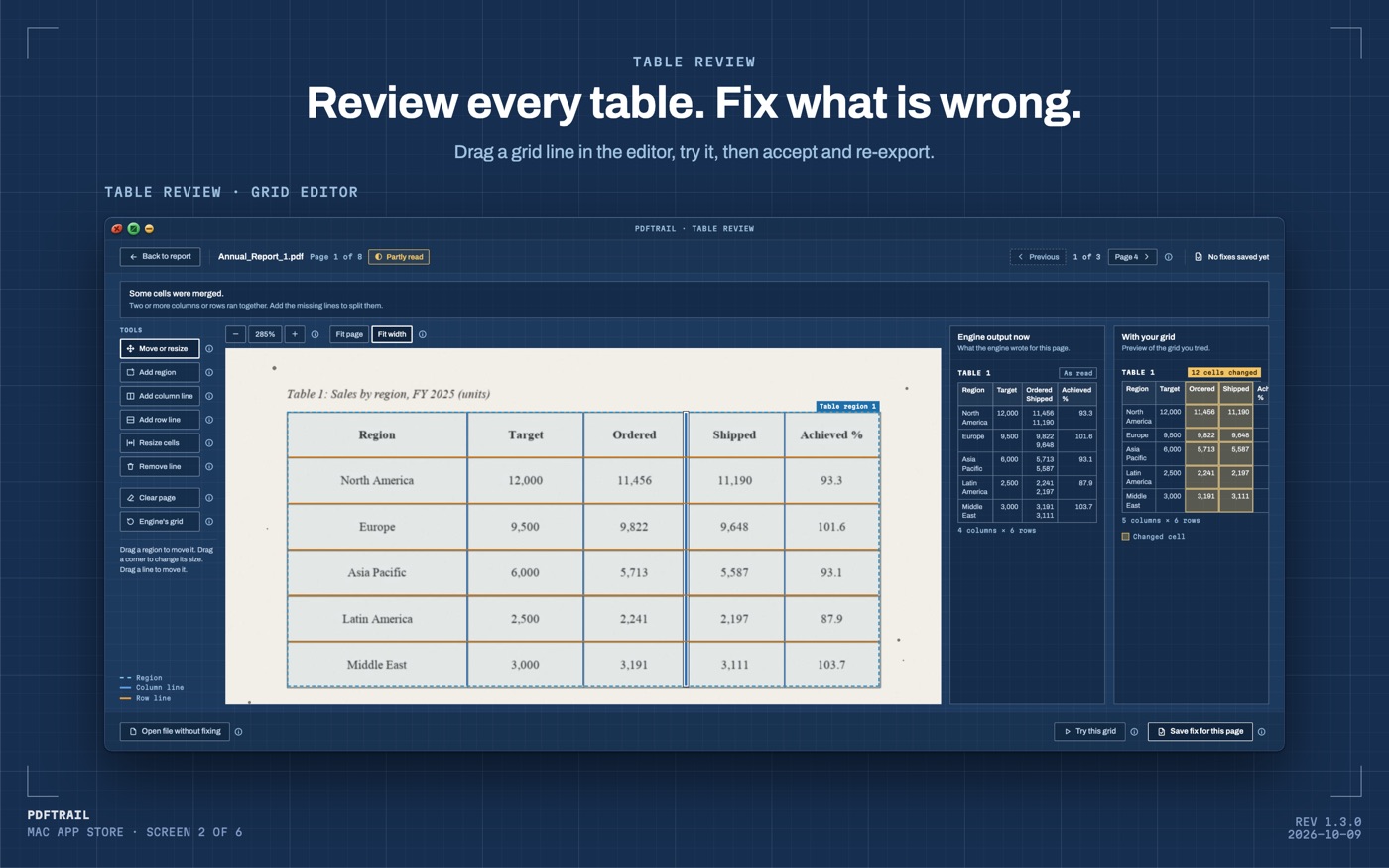
PDFTrail doesn't pretend to know. It shows the whole table in the review screen, right next to the source page. You are the one looking at the worn crossbar and deciding what it says, before you rely on that digit. What that screen shows you, and why it exists at all, is the whole subject of this post.
How PDF table extraction works, from a page to a grid
Step back from the one box and look at what a PDF actually is. A PDF is a page-description format. It was built to show the same printed page the same way on every device, not to hold a spreadsheet. The PDF Association is the technical body behind the format's open specifications. It describes its own mission as delivering a vendor-neutral platform for building those specifications and standards. That is a formal way of saying the same thing: one page description, held stable across every tool that reads or writes it, not a data model underneath.
A word processor or an invoicing program lays a table out on screen a moment before it saves the file. By the time the PDF is written, that table is gone. What is left is a set of text runs, each pinned to its own coordinates, plus separate drawing commands for any lines the page prints. There is no table object sitting in the file to open and read.
So the engine rebuilds one. It groups text runs whose baselines line up into proposed rows. It looks for runs that repeat in the same horizontal band down the page, which marks where one column ends and the next begins. When the page also draws ruling lines, actual lines under or beside the text, those settle a column boundary more precisely than position alone can. Row grouping plus column grouping gives a grid, and that grid is what turns into the table in your export.
Why a downloaded file needs no guessing, and a scan does
A born-digital PDF, one produced by software rather than a scanner, already stores exact character positions on the page. A statement downloaded from a bank's website is one. An invoice emailed straight from an accounting system is another. The app reads those characters directly from the file and applies the row-and-column reasoning above, and there is nothing to guess at, because nothing on that page was ever a picture. The fuller walkthrough for that case sits in the PDF to Excel guide.
A scan, a photocopy, a fax, or a phone photo saved as a PDF carries none of that. It is pixels arranged to look like a page, with no text runs stored anywhere in the file. The app runs OCR on your Mac first, to work out where the characters sit and what they say, before it can apply the same grid logic. OCR reads a clean scan well. A crooked, faded, or low-resolution one gives it more to guess at, and that is exactly where a box like my 1-or-7 turns up.
The one digit, and why the engine won't guess past it
Back to that box. OCR read it once, the same way it reads every box on the page, and nothing in that single reading says whether it is right. PDFTrail writes that reading to the file, but it does not move on quietly. It shows the table that box sits in beside the source page, so you look at the actual printed invoice before you rely on that number.
That same refusal to guess runs wider than one digit. A grid built from scattered fragments on a noisy scan can look table-shaped and still be wrong, columns assembled out of print bleed and scanner banding rather than real rows. I have written before about what a fabricated table costs once the engine invents one instead of admitting a page beat it. I will not retell that story here. The rule it left behind holds for a single digit the same way it holds for a whole table. Something the engine is not confident about does not get invented to make the export look complete. A missing value is a real cost. An invented one is worse, because a wrong number sits in a cell looking exactly like a right one.
Why the review step exists
A grid, and a doubtful digit inside it, are both reconstructions, not facts stored in the file. So PDFTrail shows you the detected table once the conversion is done, in Table Review. It opens by itself when a page needs a look. You see the rows and columns next to the page they came from, and a digit like my 1-or-7 sits in its own cell, unchanged, for you to check against the print. PDFTrail is my app, and I built this step in on purpose, because the alternative is a faster export I would not trust on a document where trust is the entire point. If a header split into two rows, or a column boundary landed one character too far left, you catch it here, not three sheets deep in a spreadsheet you already sent along.
Back to the box
A box as ambiguous as that one is the exception, not the rule. The rest of an invoice reads the way a born-digital file would: text runs sorted into rows, sorted into columns, no OCR guess involved if the document was never printed in the first place. The scanned PDF guide covers what to expect on the slower path, when a page does need one.
One digit, sitting in the review screen next to the page it came from, instead of a silent guess in a spreadsheet cell. That is what it costs to pull a table out of a format that was never built to hold one. I would rather you pay that small cost in a minute of looking than trust a number I was never sure of myself.
FAQ
Does a PDF actually contain a table object?
No. A PDF stores text runs with coordinates and drawing commands for any lines. A table is rebuilt from that layout, never read from a stored table field.
Why does a scanned PDF need OCR but a downloaded statement does not?
A downloaded statement already has a text layer, so PDFTrail reads the characters directly. A scan is pixels, so the app runs OCR on your Mac first to find the characters.
What happens when OCR cannot tell one digit from another?
Table Review shows you the table next to the source page, so a doubtful digit sits in its cell for you to check against the print before you rely on the file.
Why does PDFTrail have a review step at all?
A rebuilt table can be wrong in either direction, missing a row or inventing one. Table Review shows you the detected grid against the source page, so you can fix it before you rely on the file.
Does any of this happen off my Mac?
No. Reading the file, running OCR, and rebuilding the table all happen on-device. Nothing is uploaded, and no internet connection is needed to convert a file.
Related guides
- Before and After: Teaching Our Engine to Read Bad Scans
- PDFTrail 1.2: Real Excel Tables from Scanned Pages
- Extract Tables from PDF Without Uploading: Why It Matters
- PDFTrail 1.3: One Table Across Pages and Table Review
Get PDFTrail
PDFTrail is on the Mac App Store — download it, try it on your own file, and pay only if it earns its keep.
GET PDFTRAIL — MAC APP STORE