
Release notes · 2026-10-12
PDFTrail 1.3: One Table Across Pages and Table Review
PDFTrail 1.3.0 has been on the Mac App Store since 10 October 2026. The change I would show first is easy to describe. A table that runs over a page break now comes out as one table, with one header row, in Excel, Word and Markdown. The rest of this post lists what else changed, in the order I would tell a friend.
PDFTrail is my app, so weigh that as you read. I will say what changed and nothing more.
What is new in PDFTrail 1.3: one table across pages
When a table continues on the next page, PDFTrail joins the pieces into one table in Excel, Word and Markdown, with one header row. A row cut by the page break becomes one row again.
The sample in the figure is a three-page stock list. Each page prints its own column titles. In the Excel sheet the item codes run on from one page to the next, and the column titles appear once, at the top.
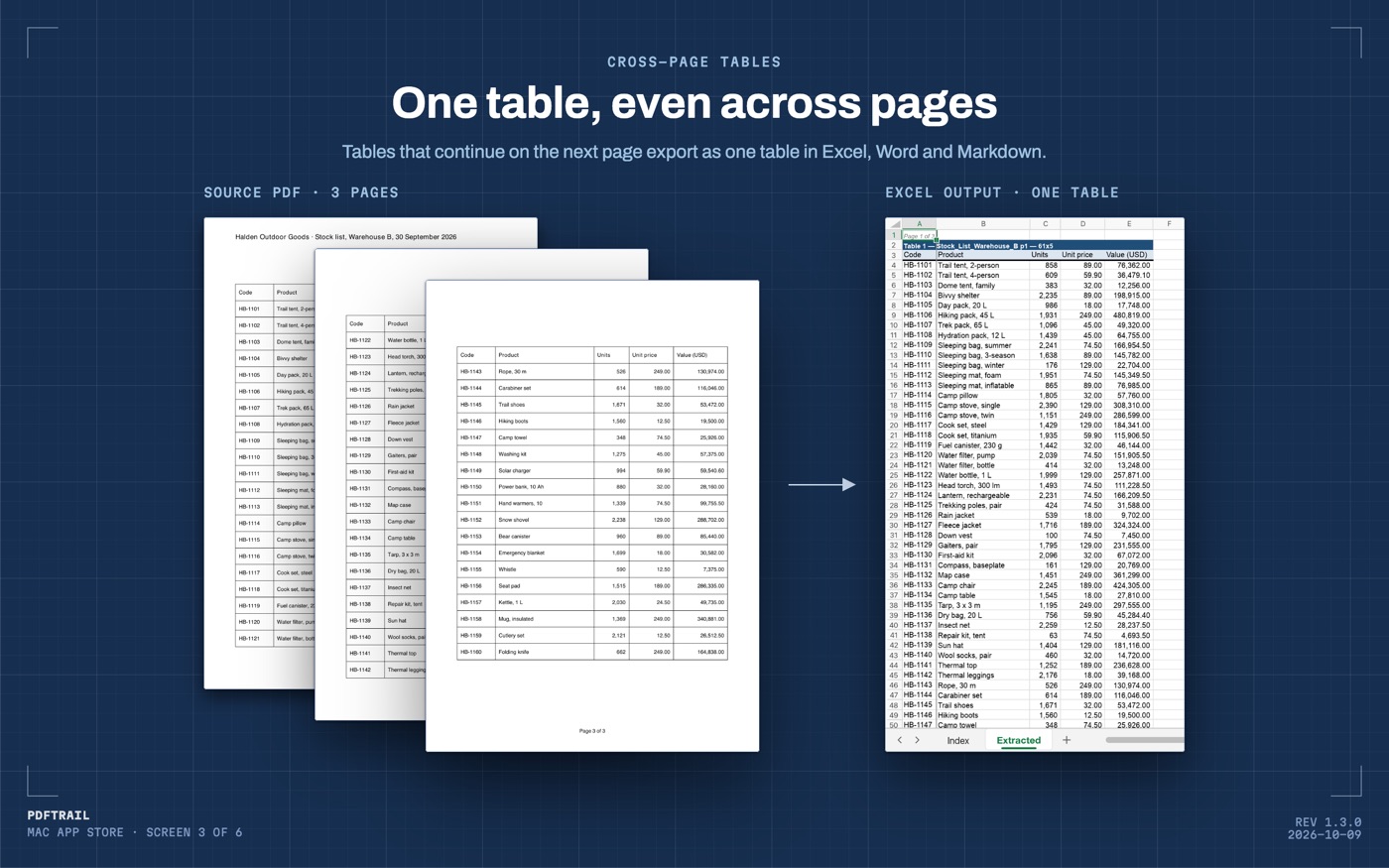
A PDF stores positioned text, page by page, not a table. A table that crosses a page break is two separate sets of rows to any tool that reads one page at a time. The reasoning behind that is in how PDF table extraction works.
The first time you convert a long document, look at the seam between two pages. If a join went wrong, it went wrong there. Check that the last row of one page and the first row of the next sit side by side, and that the header row appears once.
Table Review and the grid editor
The conversion writes the export files first. After that, Table Review opens by itself when a page needs a look, meaning a page whose tables were partly read or not read. The toolbar has a "Review tables" button for every other time.
Table Review lists each table PDFTrail found, page by page, beside the page the table came from. The check comes after the conversion and ahead of the day you rely on the file.
If a table is wrong, open the grid editor on that page. Drag the grid lines into place, add column or row lines, or draw a table region. Try the new grid, then save the fix. "Accept and re-export" writes the changed files again with your fixes. A re-export uses no free export credits.
You can also open the files as they are, without fixing anything. Fixes are saved for that PDF and apply again the next time you convert it. You can tell the app to ignore them.
The grid editor moves lines and regions. A wrong digit inside a right cell is a different problem, and you fix that one in the spreadsheet. OCR is good but not infallible, and a screen that sets the table beside the page helps you find the cell.
Cleaner text from scanned pages
The scan work in this release is five separate items.
- Cleaner text. PDFTrail keeps more of the words on a scanned page and drops repeated ones.
- Hidden text layers. Some scanners add a hidden text layer to the PDF. PDFTrail checks that layer, and reads the page again when its own reading is better.
- Watermarked circulars. Some downloaded circulars stack two copies of each page under a watermark. PDFTrail reads these.
- Lone digits on macOS 27. PDFTrail finds lone single digits that Apple's text recognizer skips, and marks them as recovered.
- Fax-compressed pages. PDFTrail opens PDF pages that use fax compression.
Layouts and scans differ, and I don't have yours. I can't tell you how a given page will come out. An earlier post, teaching the engine to read bad scans, covers the engine's history with bad scans.
Three themes and a clearer free tier
There are now three themes: Blueprint, Terminal and Field Unit. You change the theme at any time in the sidebar.
The sidebar also shows how many free exports are left for each format. The free tier works like this:
- Markdown, Word (.docx) and Excel (.xlsx) each have 10 free exports.
- Plain text (.txt) and JSON exports are free with no limit.
- After the 10 free Excel exports, Excel export keeps working with the first 15 rows of each table.
- After the 10 free Markdown or Word exports, that format stops until you unlock the full version.
- Conversions and on-screen Table Review are unlimited.
The full version is the "Unlock Full Version" in-app purchase. It costs $24, one time. There is no subscription and no account.
What stays the same
PDFTrail still converts PDFs to five formats: Excel (.xlsx), Word (.docx), Markdown (.md), JSON and plain text (.txt). Everything runs on your Mac. Nothing is uploaded, and no internet connection is needed to convert.
On a born-digital PDF, the text is read directly from the file, with the position of every character. On a scan, the app runs OCR on your Mac. Version 1.2 added OCR for images inside otherwise born-digital PDFs. The notes for that release are in the 1.2 post.
You open a file with "Open PDF" and choose it in the Open dialog. You can choose several PDFs at once. To convert a folder, open it in the dialog and select all the PDFs in it. With two or more PDFs queued, "Combine into one file per format" writes one file per format for the whole batch.
How to update
If you already have PDFTrail, open the App Store, click Updates in the sidebar, then click Update beside it. Apple's guide to updating apps on Mac covers the steps.
Convert one long document with the new version, and look at the page break first.
FAQ
What is new in PDFTrail 1.3?
Tables that run over several pages become one table. Table Review shows each table and has a grid editor. Scanned pages give cleaner text. There are three themes, and the sidebar shows your free exports.
Which Macs does version 1.3.0 run on?
It needs macOS 12 or later on an Apple Silicon Mac.
How do I get 1.3.0 if I already have PDFTrail?
Open the App Store on your Mac, click Updates in the sidebar, and click Update beside PDFTrail.
Do I need an internet connection to convert a file?
No. Everything runs on your Mac. Nothing is uploaded, and no account is needed.
How much does it cost?
It is free to try, with 10 free exports per format for Markdown, Word and Excel. The full version is a $24 one-time unlock, no subscription.
Related guides
- Why a PDF Has No Tables (and How We Find Them Anyway)
- Before and After: Teaching Our Engine to Read Bad Scans
- PDFTrail 1.2: Real Excel Tables from Scanned Pages
- Extract Tables from PDF Without Uploading: Why It Matters
Get PDFTrail
PDFTrail is on the Mac App Store — download it, try it on your own file, and pay only if it earns its keep.
GET PDFTRAIL — MAC APP STORE