
Field guide · 2026-10-13
PDF Table Across Multiple Pages to Excel on Mac
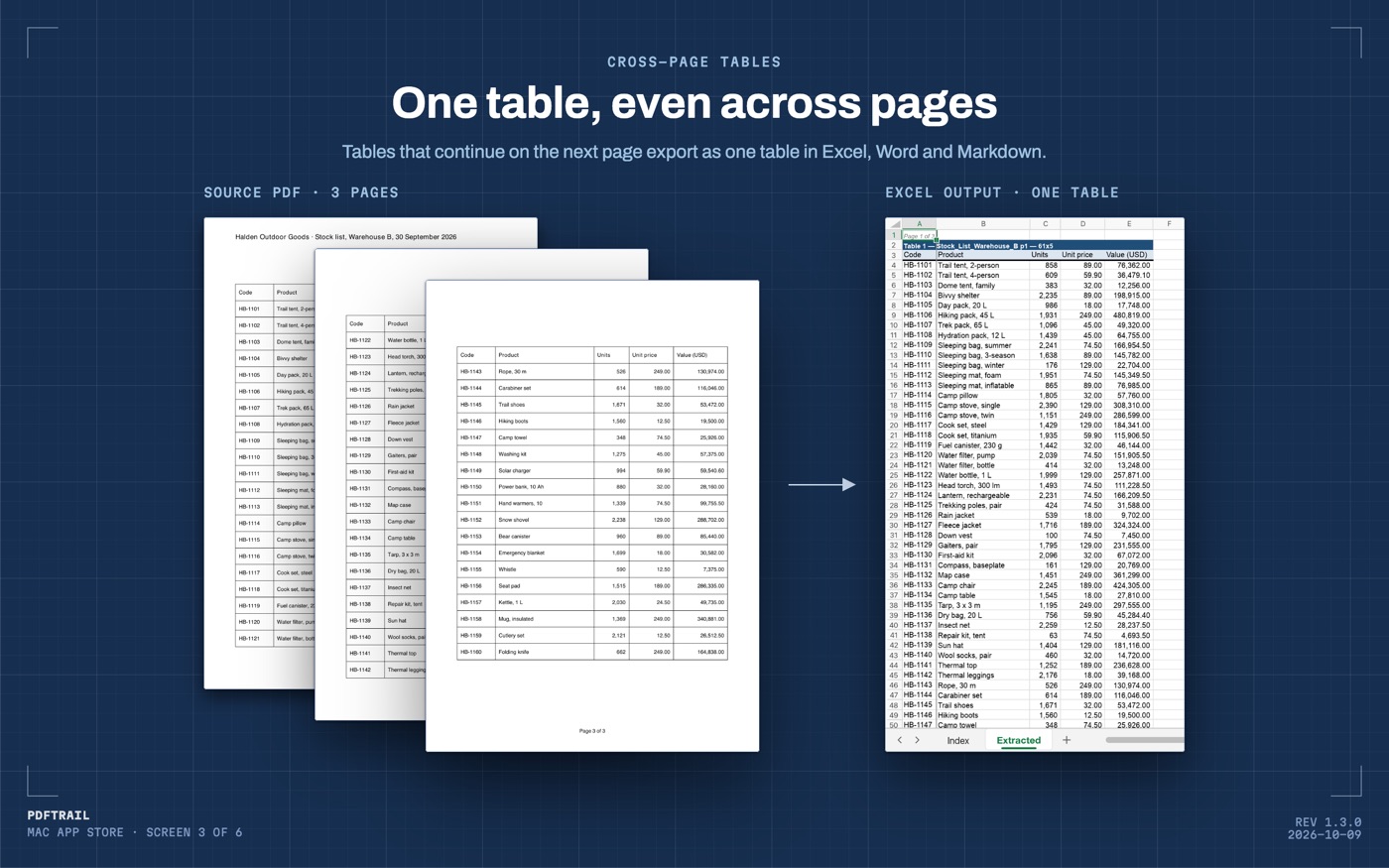
The sample stock list in the figure below runs three pages. Page 1 ends with HB-1121, a water filter. Page 2 opens with the column titles again, then HB-1122, a water bottle. Nothing in the PDF says those two rows belong to one table. That is why a pdf table across multiple pages to excel so often arrives as two tables, with a second header stranded in the middle of the sheet.
Why a page break splits a table
A PDF is a stack of pages. Each page is its own description of positioned text and lines. The file stores text and lines, not a table, so nothing in it can run on from one page to the next.
The program that made the PDF laid out a long table, ran out of room, and started a new page. Often it printed the column titles again at the top, so that page 2 can be read alone. On paper that is good design.
A tool that rebuilds tables from geometry, one page at a time, sees something else. It finds a table on page 1 and another on page 2, and the second one starts with a header of its own. The rule is the one behind every table in a PDF: the file stores where the text sits, not what it means. I wrote about that rule in how PDF table extraction works.
Paste both pieces into one sheet and the damage is quiet. In the sample, a sheet built page by page would hold HB-1121, then a row reading Code, Product, Units, Unit price, Value (USD), then HB-1122. That middle row looks like data, and it is not.
Excel's Sort dialog expects one header row at the top. It has a box for it. Microsoft's page on sorting a list in Excel for Mac says to select "My list has headers". A header row in the middle of the data has no such box. It is one more row to sort, and it moves with the rows around it.
A row that wraps across the break is worse. If the page ends inside a row, the top half closes page 1 and the bottom half opens page 2. You get two rows, each half empty.
You can join the pieces by hand. Copy the rows from page 2 under the rows from page 1, then delete the second header. For three pages that is a short job. For thirty pages it is where a missed row hides. Excel and Numbers will not open a PDF as a table, and copy-paste from Preview loses the columns anyway. The PDF to Excel guide covers those routes.
Moving a PDF table across multiple pages to Excel
PDFTrail is my app. In version 1.3.0, when a table continues on the next page, it joins the pieces into one table in Excel, Word and Markdown, with one header row. A row cut by the page break becomes one row again. The conversion runs on your Mac and nothing is uploaded.
- Choose "Open PDF", then select your long document in the dialog.
- Run the conversion. When it ends, the export files are on disk.
- Open the Excel file and go to the row where the first page ended.
- Check the seams, using the list in the next section.
- If a page needs a look, open Table Review. It opens by itself for a page whose tables were partly read or not read. At any other time, click "Review tables" in the toolbar.
The same join applies in Word and in Markdown. Check the seams there too if that is the file you will use. A long table in a Markdown file is the same rows, in the same order, under one header line. A second header line in the middle would be one more row of text to whoever reads the file next, whether that is a person or a language model.
The join is the part I would not take on trust. A long table is the case where one small error costs the most, because a missed row at a page break does not look like an error. It looks like a shorter table.
What to check after the conversion
I check the seams before I check the totals. A seam is the place where one page ended and the next began. If the join went wrong, it went wrong there.
- The rows on each side of every page break. In the sample, HB-1121 sits directly above HB-1122, and no header row sits between them.
- The header row. It should appear once, at the top. A second copy lower down means the pieces did not join.
- Half-empty rows. A row with blanks next to a full row can be one row that a page break cut in two.
- The last row. Compare it with the last row on the last page of the PDF. The sample's codes run in order to HB-1160, so a missing code would show as a gap.
- The total. If the table ends in a total, add the rows above it in a spare cell and compare.
Table Review shows each table PDFTrail found, page by page, next to the page it came from. If a table on one page is wrong, open the grid editor on that page. Drag the grid lines into place, try the new grid, and save the fix. "Accept and re-export" then writes the files again with your fixes. A re-export uses no free export credits.
Layouts differ, and I don't have yours. I can't say how a long table in your PDF will come out. The check above costs little, and it tells you.
Financial documents often hold tables that run over several pages. The annual report guide covers one such document type.
Back to HB-1121
The page break is still in the PDF. In the spreadsheet, HB-1121 sits directly above HB-1122, and the column titles appear once.
FAQ
Why does a table that runs over a page break come out as two tables?
A PDF stores each page on its own, as positioned text. Nothing in the file marks the rows on page 2 as a continuation, so a tool that reads page by page finds one table per page.
Does PDFTrail join a table that continues on the next page?
Yes, since version 1.3.0. It joins the pieces into one table in Excel, Word and Markdown, with one header row. A row cut by the page break becomes one row again.
How do I check that the join is right?
Look at the rows on each side of every page break, and check that the header row appears once. Table Review shows each table next to the page it came from.
Does the conversion need an internet connection?
No. Everything runs on your Mac. Nothing is uploaded, and no account is needed.
How much does it cost?
It is free to try, with 10 free Excel exports. The full version is a $24 one-time unlock, no subscription.
Related guides
- PDF to Excel on Mac: The Complete Guide (2026)
- How to Convert a Bank Statement PDF to Excel on Mac
- SBI Bank Statement PDF to Excel on Mac
- HDFC Bank Statement PDF to Excel on Mac
- ICICI Bank Statement PDF to Excel on Mac
Get PDFTrail
PDFTrail is on the Mac App Store — download it, try it on your own file, and pay only if it earns its keep.
GET PDFTRAIL — MAC APP STORE