
Comparison · 2026-09-25
Tabula vs PDFTrail: Extract PDF Tables on a Mac
Go to Tabula's own page and it tells you plainly what it is: "Tabula will always be free and open source." No account, no fee, no catch buried in the fine print. Windows and Linux users "will need a copy of Java installed" first; the Mac build carries Java along with it. And the page is just as plain about the limit: "Tabula only works on text-based PDFs, not scanned documents." Read it once. You already know most of what a search for tabula alternative mac is really asking about.
That is a fair trade for a lot of people, and I want to say so before anything else. Tabula is free, it is open source, and a project that has stayed both for years has earned some respect. For a report downloaded from a website, opened in a browser you already trust, it does the job without asking you to pay anyone. Most people typing "tabula alternative mac" into a search box are not doubting that. They have hit one of two walls, a scan or a stack of files, and want to know what closes the gap.
What both tools are actually doing
A PDF does not store a table. It stores short runs of text, each one pinned to a spot on the page: this word at this x and y, the next word a little to the right. A table is what you see when those runs happen to line up well. Any tool that claims to extract a table is really doing one thing: working out which runs share a row, and where one column ends and the next begins.
Tabula does that work when you draw a box. You open a page, click and drag a rectangle around the table, and it reads the positioned text inside that box and sorts it into rows and columns. PDFTrail does the same underlying read, without asking you to draw the box, across a whole document rather than one selection at a time.
Tabula alternative mac: where the two part ways
The split starts with the file itself. Tabula's box-drawing only works because there is text to select, and that is exactly what a scan does not have. A scanned statement, a faxed form, a photo of a printed page saved as a PDF: these carry pixels, not letters, and Tabula says so upfront rather than pretending otherwise. PDFTrail runs OCR on a scan, on your Mac, and shows you the table it found in Table Review, because OCR is good but not infallible.
The next split is volume. Tabula reads one PDF at a time, with a box drawn by hand on every table, on every page. That is fine for one report. It stops feeling fine somewhere around a folder of them. PDFTrail takes that whole folder in a single batch run.
Then there is the interface. Tabula on a Mac still opens through a local browser tab, even with Java bundled in. PDFTrail is a native Mac app: no Java runtime, and no browser window standing in for the app.
Last is where the data lands when you are done. Tabula exports to a CSV or an Excel file, which covers most spreadsheet work. PDFTrail exports to Excel, Word, Markdown, JSON, and plain text, so the same read can feed a report as easily as a spreadsheet.
When Tabula is still the right call
Say your PDF is a single downloaded report, it has real text in it, and you are happy opening a browser tab and drawing one box. Tabula does that job well, for nothing, and I would not talk you out of it. The friction only shows up once a scan enters the pile, or the pile itself gets long enough that drawing boxes by hand starts to feel like the actual work.
Converting a PDF in PDFTrail, step by step
- Click Open PDF, then choose the PDF in the dialog. For a batch run, choose several PDFs at once, or open a folder in the dialog and select every PDF in it.
- Let it read the file. A PDF with a text layer is read straight from the file; a scan goes through OCR on the Mac first.
- Check Table Review. Confirm the rows and columns match the source page before you rely on the file. It opens by itself when a page needs a look, and the toolbar button Review tables opens it whenever you want it.
- Open the Excel, Word, Markdown, JSON, or plain text file the conversion wrote.
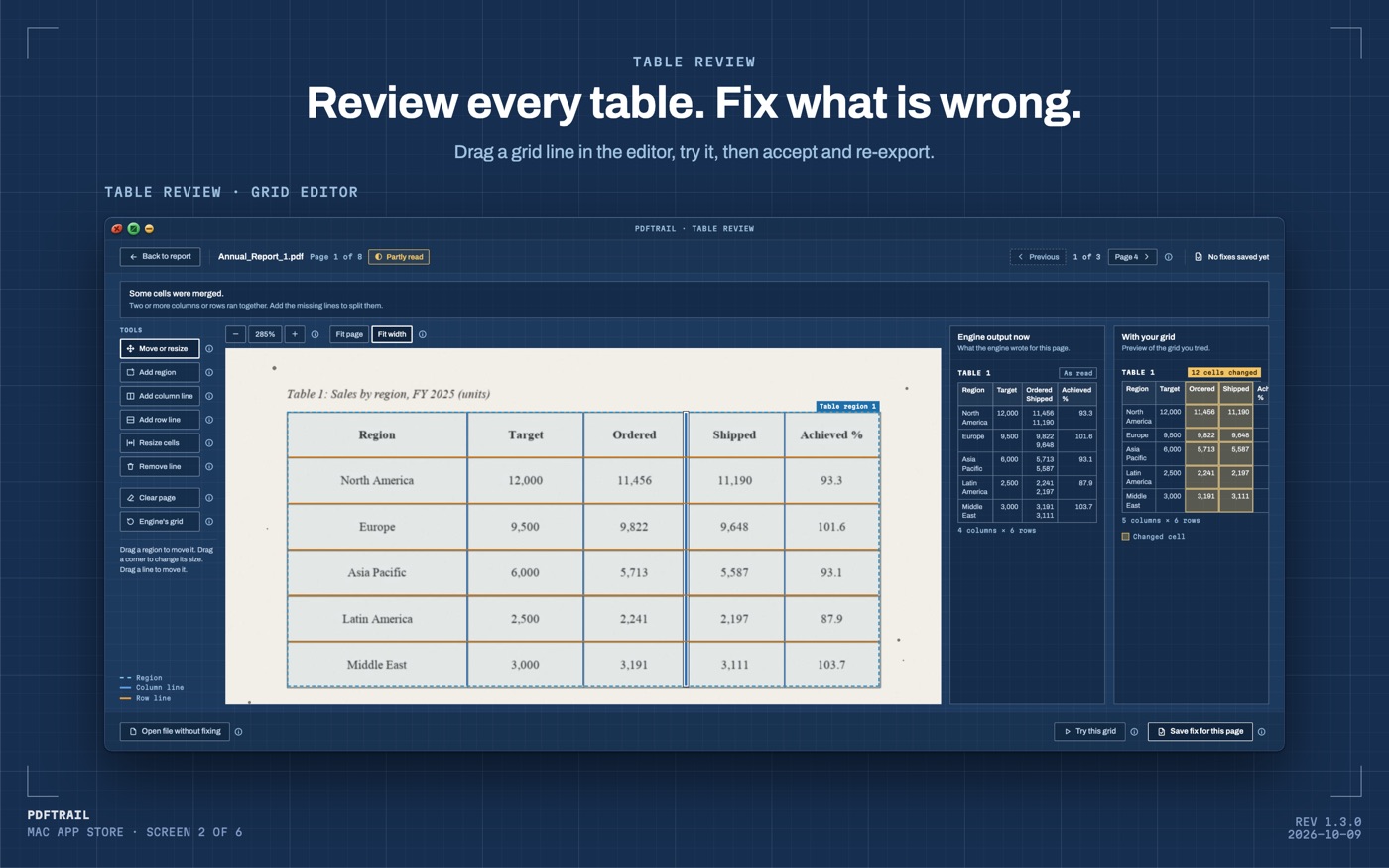
PDFTrail is my app. I built it because I wanted Indian annual reports inside a language model and would not upload them to get there. Once the engine could find a table in a born-digital PDF, teaching it to handle a scan and a folder of scans was the natural next step. The unlock is a one-time purchase, with free exports per format to try it on your own files first.
Back to Tabula's page
Reread it and the pitch still holds up: free, open, and honest about what it will not do. That honesty is worth something. Your file might be a scan, or there might be dozens of them in a folder, or you might just rather not open a browser tab to draw boxes. Any of those, and a native app on your Mac picks up where that page's own stated limits begin. Neither tool needs to win. You just need the one that matches the PDF in front of you.
If your files are bank statements specifically, the bank statement guide walks through that document type. The PDF to Excel guide covers the wider case. Importing a PDF into Excel for Mac covers what Excel itself can and cannot do with a PDF.
Read the page you are borrowing a tool from. Tabula's tells you exactly what it does, and so should the one you pick after it.
FAQ
Is Tabula really free?
Yes. Tabula's own site says it will always be free and open source, and it runs on Mac, Windows, and Linux.
Can Tabula pull tables from a scanned PDF?
No. Tabula's site says it only works on text-based PDFs, not scanned documents, so a photocopy or phone photo needs a different tool.
Does Tabula need anything installed on a Mac?
The Mac build bundles Java for you, then opens its table-selection screen in a browser tab rather than a native app window.
Why would someone look past Tabula at all?
Mostly scans, mostly volume. A single text-based PDF is Tabula's home turf; a folder of scans is where a native app on your Mac earns its keep.
Does PDFTrail need an internet connection?
No. It runs entirely on your Mac, so conversion works offline and the file never leaves the device.
Related guides
- PDF to Excel on Mac: 7 Tools Compared Honestly
- Excel for Mac Has No From PDF Import: What to Do Instead
- camelot and pdfplumber vs a Mac App for PDF Tables
- Adobe Acrobat Export PDF to Excel vs On-Device on Mac
Get PDFTrail
PDFTrail is on the Mac App Store — download it, try it on your own file, and pay only if it earns its keep.
GET PDFTRAIL — MAC APP STORE