
Comparison · 2026-09-23
Excel for Mac Has No From PDF Import: What to Do Instead
Open Excel on a Windows PC, click the Data tab, and Get Data offers an entry called From PDF. Open the same Data tab in Excel for Mac and the entry is not there. Not greyed out, not moved into a submenu you haven't found yet. Absent. Anyone trying an Excel for Mac import PDF workflow for the first time runs into this exact wall. Usually a guide written for Windows sent them looking for a button that was never built for their machine.
Microsoft's own page on Power Query data sources lists every connector against every version of Excel, and the PDF row carries a note about needing a Windows-only piece of software underneath it. The tables for Excel on the web and Excel for Mac don't list PDF as a data source at all. It isn't hidden somewhere else on those platforms. It was never shipped there.
Why the connector stopped at Windows
On Windows, From PDF opens the file, scans the pages, and offers up the tables it can find inside the Power Query editor, ready to load into a sheet. Microsoft's table marks the PDF row as needing .NET Framework 4.5 or later, which is Windows software. The table for Excel for Mac has no PDF row.
Nobody pulled the feature out. It sits on the Windows side of a platform line, and nothing since has moved it.
A PDF itself explains why the import is hard work in the first place. It is not a spreadsheet stored under a different name. A PDF holds short runs of text, each one anchored to a position on the page, with nothing inside the file that labels a row or a column. From PDF has to look at where those runs sit and infer which ones line up. Any tool on any platform that claims to pull a table out of a PDF is doing that same inference, not reading a table that was already there.
What a Mac user tries first
Without From PDF, the search for a workaround tends to run through the same few stops, and each one runs out of road for a different reason. Preview will let you select a page and copy the text. Paste that into a cell and every fragment lands on its own line, because Preview never knew there were columns to keep together. Numbers has no PDF import of its own. Word opens a PDF and tries to convert it, but Word is built for prose, and it usually pulls a table's grid apart while it works.
Somewhere in that search, a person lands on an online converter and uploads the file, hoping the site gets the columns right. That page now sits on a server nobody at the Mac end controls, which is a bad trade for a bank statement or a client invoice.
Ask an AI assistant instead, and some will describe the very menu path Windows users have. So much written about Excel describes Windows without saying so, and the assistant repeats it without checking your platform. That answer sends a Mac user straight back to the button that was never there.
The excel for mac import pdf workflow I built
PDFTrail is my app, and it exists because getting a PDF's text onto a Mac spreadsheet needed a tool that assumed macOS from the start rather than porting a Windows habit late. It reads a PDF's own text and the position of each character, then works out which runs share a row and where the column lines fall. Once the conversion is done, it shows you the result next to the page.
The steps for an excel for mac import pdf task, once you are inside the app, stay short.
- Click Open PDF and choose the PDF in the Open dialog. No upload screen, no account to create first.
- Let it read the file. A born-digital PDF, one made by software rather than a scanner, already carries its text and the position of every character, so the app reads that directly. No OCR guessing.
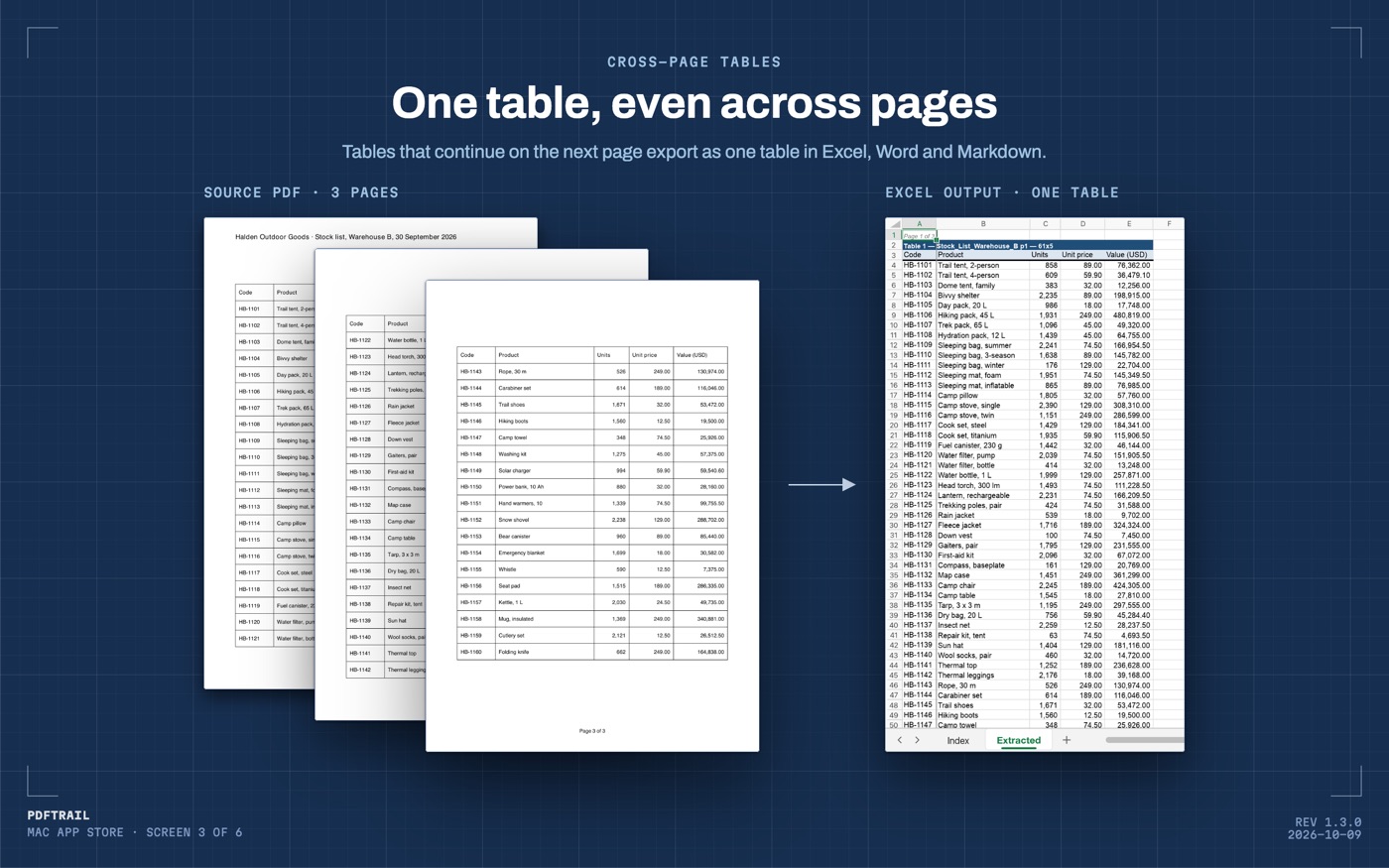
- Check Table Review. Once the conversion is done, the app shows the rows and columns it found, so you can confirm dates sit under the date heading and totals sit under the totals heading. It opens on its own if a page needs a look, and the toolbar's Review tables button opens it at any other time.
- Open the .xlsx in Excel for Mac. If you fixed a table, click Accept and re-export before you open it.
If the source is a scan instead of a downloaded file, a photocopy or a faxed page with no text layer, the app runs OCR on the Mac first, before it can find any rows. OCR reads an image of a character, not the character itself, and it can misjudge one, which is exactly why Table Review exists.
What to check once the sheet is open
Compare the row count in the exported sheet against what you can count on the source page. Table Review shows this table next to the page, so a second count now confirms what you checked there. On a scanned file, look at the numbers against the page again and check that the totals still add up, since that review step is where a misread digit gets caught.
For a folder of statements or invoices rather than one file, open it in the dialog and select all the PDFs in it. Batch conversion runs them in a single pass, and you still check each result in Table Review. That review step is the one place I would not want to automate away, because it is the only moment the numbers and the source page sit next to each other.
The pillar guide to PDF to Excel on a Mac covers other document types this same way, and the bank statement walkthrough goes through a financial document end to end.
Back at the Data tab
Go back to Excel for Mac and click Get Data again, and From PDF is still not there. It was never taken away, so there is nothing to wait for and nothing to file a complaint about. The gap is a fact about the software, not a bug some future update quietly fixes.
What changes is not the menu. It is what you do before you open Excel at all: read the PDF with something built for the platform you are actually on. Then let Excel do what it was always good at, once the rows already exist.
FAQ
Why is there no From PDF option under Get Data on my Mac?
The Power Query PDF connector was built for Excel on Windows and was never added to Excel for Mac, so the menu item you are looking for does not exist there.
Does Excel for Mac support any other way to import a PDF?
No. Numbers has no PDF import either, and Word can open a PDF but tends to break a table apart because it is built for prose, not grids.
Is a Mac version of the From PDF connector coming?
Microsoft has not announced one, so the practical move is to work around the gap now rather than wait for it to close.
Why did an AI assistant tell me the connector exists on my Mac?
Many written answers about Excel describe Windows behavior without noting which platform they mean, and an assistant trained on that text can repeat the same mistake with confidence.
Can I get a PDF table into Excel on a Mac without uploading the file?
Yes. PDFTrail reads the PDF and writes the table to an Excel file on your Mac, with nothing sent to a server, and it works with Wi-Fi off.
Related guides
- PDF to Excel on Mac: 7 Tools Compared Honestly
- Tabula vs PDFTrail: Extract PDF Tables on a Mac
- camelot and pdfplumber vs a Mac App for PDF Tables
- Adobe Acrobat Export PDF to Excel vs On-Device on Mac
Get PDFTrail
PDFTrail is on the Mac App Store — download it, try it on your own file, and pay only if it earns its keep.
GET PDFTRAIL — MAC APP STORE