
Field guide · 2026-10-22
Scanned Invoice PDF to Excel on Mac
One file that taught me about checking was a loan application, 174 pages, scanned from paper, from an Indian public-sector bank. I ran it through the engine while I was building it, converted it to Markdown and Word, and then checked the key identification numbers by hand against the pages. OCR reads a scan well. It does not read one infallibly, and the only check that counts is your own eye on the page. A scanned invoice is that same problem on a single page, with money on it.
Turning a scanned invoice to Excel is a different job from converting an invoice your supplier emailed from their billing software. The emailed one holds its text. The scan holds a picture of the text. Copying from Preview loses the columns anyway, because a PDF stores positioned fragments, not a table. Retyping a pile of invoices is an evening you will not get back.
What a scanned invoice is made of
A scanner turns paper into pixels. The pixels carry no letters, so OCR has to decide where the letters are and which ones they are. Then something has to decide which of those letters share a row and where the columns break, because the table you can see on the invoice does not exist in the file.
Each step has room to go wrong. A stamp across a line, a fold, a crooked page, a second-generation photocopy: any of these can move a digit into the wrong column or change one digit into another. Invoices are tough in particular because they are mostly numbers, and a wrong digit in a number looks like a right number.
Layouts differ by supplier and by billing software. An invoice generally has line items, a tax amount and a total, but I can't tell you the exact order of your supplier's columns, and I don't have your invoice. That is why the check sits in the process, not at the end of it.
Scanned invoice to Excel, step by step
PDFTrail is my app, and the steps below are the route I take.
- If you still hold the paper and the scan is poor, scan it again. Apple's Preview guide says to set Kind to Text for high-contrast black-and-white documents and to Color for color pages, and it also describes scanning from an iPhone or iPad. I would rescan before I would repair a table by hand.
- Click Open PDF in PDFTrail and choose the file. For a pile of invoices, choose several PDFs at once in the Open dialog.
- Convert. For a page with no text layer, PDFTrail runs OCR on your Mac. Some scanners add a hidden text layer. PDFTrail checks it and reads the page again when its own reading is better.
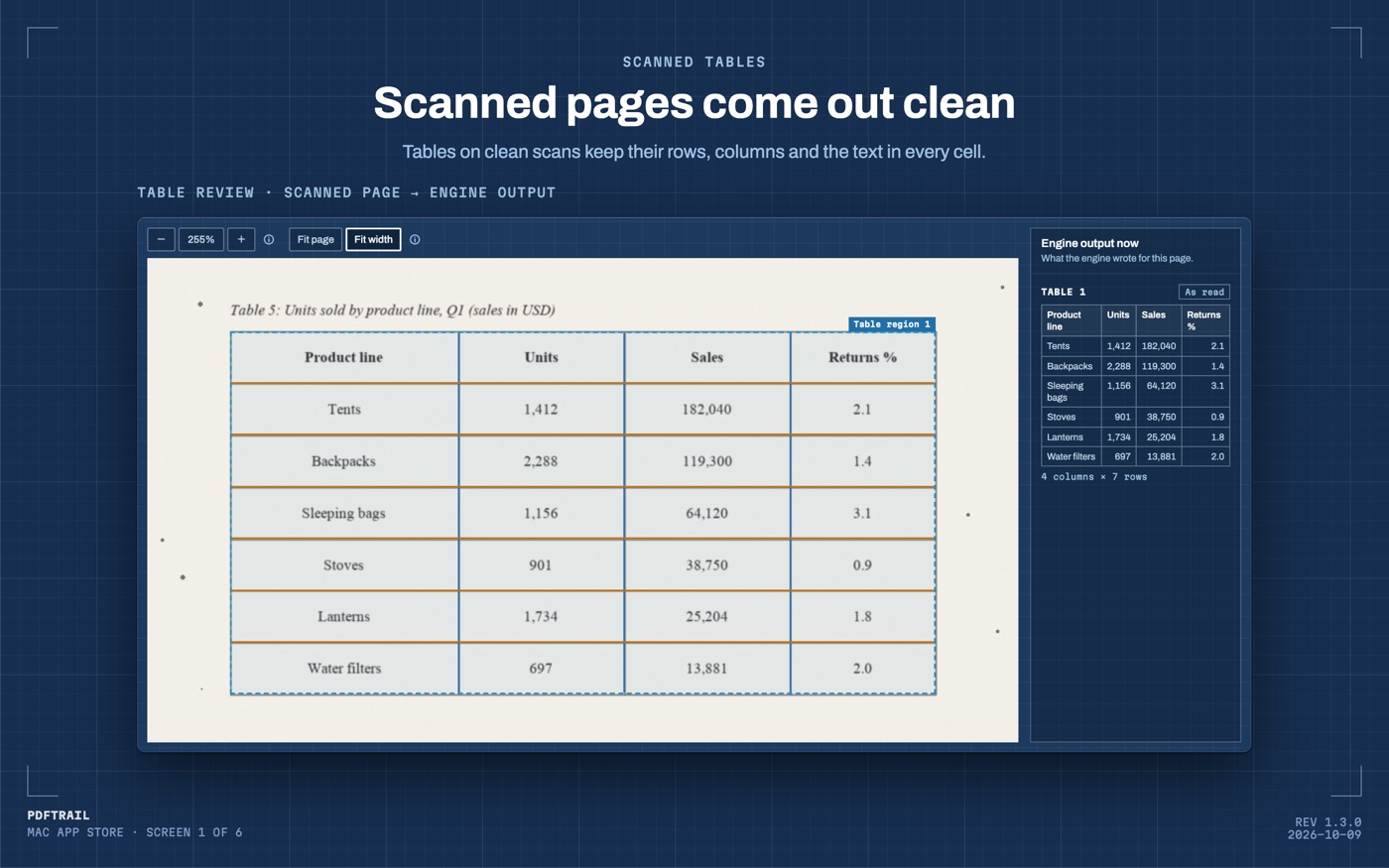
- The conversion writes the export files. Open Table Review: it opens by itself when a page needs a look, and the Review tables button in the toolbar opens it the rest of the time.
- Put the line-item table beside the scan. Read the amounts, digit by digit, against the print.
- If a table is wrong, open the grid editor. Drag the grid lines into place, add column or row lines, or draw a table region. Try the new grid, then save the fix.
- End with Accept and re-export. Your fixes go into rewritten files, and a re-export uses no free export credits.
Checking an invoice with arithmetic
An invoice carries its own proof. Use it in Excel.
Multiply quantity by rate on each line and compare with the amount on that line. Add the line amounts and compare with the subtotal the page prints. Add the tax to the subtotal and compare with the total.
Each of those is a sum your own eye can do in seconds. A misread digit usually breaks at least one of them, and the broken sum tells you which row to look at. Go back to Table Review, put the row beside the scan, and read it.
A long invoice and a pile of invoices
An invoice with many line items can run onto a second page. When a table continues on the next page, PDFTrail joins the pieces into one table in Excel, Word and Markdown, with one header row. A row cut by the page break becomes one row again. Check that seam in Table Review. Read the closing row of one page and the opening row of the next against the scan.
For a pile of invoices, choose them all at once in the Open dialog, or open the folder in the dialog and select all the PDFs in it. Every PDF in the queue converts in one run. Table Review opens by itself when a page needs a look, so you spend your attention on the pages that need it.
Fixes are saved for that PDF and apply again the next time you convert it. A supplier's next invoice is a new file, so it gets its own check.
What 1.3.0 changed for scans
The 1.3.0 scan fixes include cleaner text from scanned pages (more words kept, repeated words dropped). PDFTrail also opens fax-compressed PDF pages. On macOS 27, it finds lone single digits that Apple's text recognizer skips and marks them as recovered. A quantity column is full of lone digits, so that last change matters on an invoice.
None of this turns a scan into a born-digital file. It makes the reading cleaner, and you still check it.
Back to the loan file
I checked the key identification numbers in that file because someone relies on them in a loan file. An invoice is the same, at a smaller size.
For the wider scan route, the scanned PDF to Excel guide covers it page by page, and the GST invoice guide covers a folder of invoices.
Add the lines up, then add the tax, and trust the total only when both sums agree.
FAQ
Can PDFTrail read a scanned invoice with no text layer?
Yes. PDFTrail runs OCR on your Mac for any page with no text layer. OCR is good but not infallible, so check the tables in Table Review after the conversion.
Do I need to rescan a poor invoice?
If you still hold the paper, a fresh scan is the cheapest repair. Apple's Preview guide describes scanning from a scanner or from an iPhone or iPad. Convert the new file the same way.
Does the invoice leave my Mac?
No. The scan is read on your Mac. Nothing is uploaded, and no account or internet connection is needed to convert.
How do I check that the amounts are right?
Do the arithmetic. Multiply quantity by rate on a line, add the line amounts, then add the tax and compare with the printed total. A misread digit usually breaks one of those sums.
What does it cost?
It is free to try, with 10 free Excel exports. After those, Excel export keeps working with the first 15 rows of each table. The full version is $24 one-time, with no subscription.
Related guides
- Scanned PDF to Excel Mac: OCR Without Uploading
- Convert a Scanned Bank Statement to Excel on Mac
- Fix OCR Table Errors on Mac: Five Shapes to Look For
- Photographed Table to Excel on Mac (Phone Photo PDF)
- Preview Live Text vs OCR for PDF Tables on Mac
Get PDFTrail
PDFTrail is on the Mac App Store — download it, try it on your own file, and pay only if it earns its keep.
GET PDFTRAIL — MAC APP STORE