
Field guide · 2026-10-12
Fix OCR Table Errors on Mac: Five Shapes to Look For
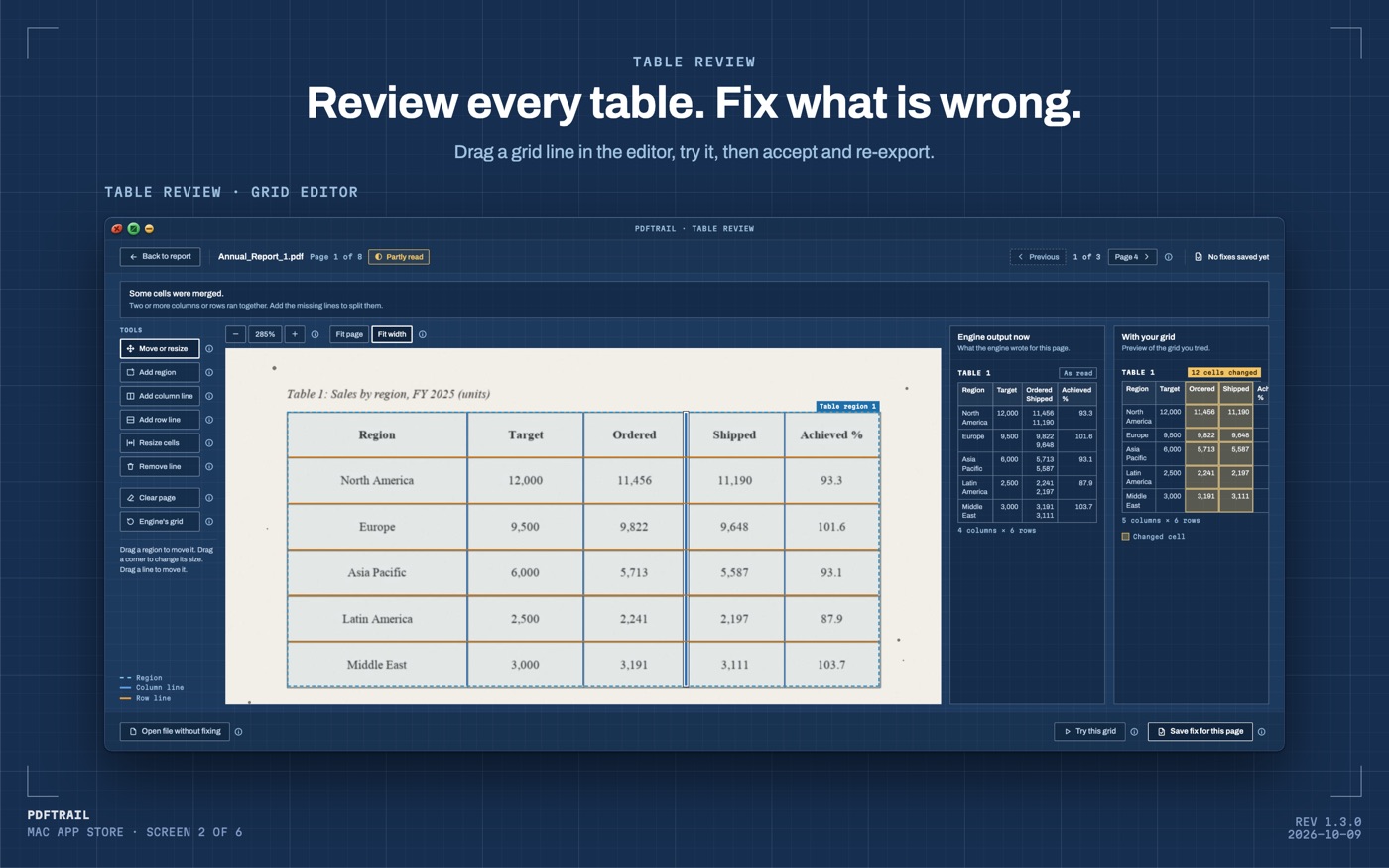
On the sample page in the figure, PDFTrail's first reading of a sales table has four columns where the page has five. Ordered and Shipped are pressed into one column, with two numbers stacked in every cell. The page is marked "Partly read", and Table Review is open on it. That is the first of five shapes a wrong table takes, and it is a good place to start if you need to fix OCR table errors.
What happens after you convert
PDFTrail is my app, so here is the order of things exactly. You convert a file, and PDFTrail writes the export files. If a page needs a look, because its tables were partly read or not read, Table Review opens by itself. At any other time you open it with the "Review tables" button in the toolbar.
Table Review shows each table PDFTrail found, page by page, next to the page it came from. You check the tables after the conversion, before you rely on the file. You can also open the files as they are, without fixing anything.
A scan stores pixels, not text. OCR decides where the letters are. Then the engine decides which pieces of text share a row and where the column boundaries fall. OCR is good but not infallible, and either decision can be wrong. A wrong decision shows up as one of five shapes.
Five shapes of a wrong table
Two columns pressed into one. This is the sample page. A date and its description, or a debit and its credit, share one cell where the page has two. The gap between those columns on the page can be narrow, and then no column boundary lands inside it. Look for a cell that holds two values. In the grid editor, add a column line between them.
One row split across two. One line of the page becomes two rows, and one of the two is mostly empty. A line of text that wraps onto a second line can cause it. Look for a row with blanks sitting next to a full row. Drag the row line that cuts through the row into the gap between rows.
A header read as a data row. A row of words sits where the rows around it hold numbers. The titles from the top of the page can end up there, and so can a title that repeats lower down. The cells are fine. The row is not data. Check the lines around it first. If they are right, treat the row as a header in the spreadsheet or delete it.
A digit that looks wrong next to the page. The scan has a faint or blurred mark, and OCR reads an 8 as a 3, or a 1 as a 7. The column is right, and the character inside it is wrong. No grid line fixes that. Read the number on the page again and correct the cell in the spreadsheet.
A total that does not add up. The table prints a total, and the rows above it add up to something else. Add those rows yourself in a spare cell. Microsoft's page on AutoSum shows how to total a column. If the gap looks like one wrong digit, check the cells in that column first. If it is much larger, look for a pressed column or a split row.
How to fix OCR table errors in the grid editor
- Click "Open PDF" and choose the file in the Open dialog.
- Convert the file. PDFTrail writes the export files.
- If Table Review opens by itself, a page needs a look. If not, click "Review tables" in the toolbar.
- Compare each table with the page beside it. Look for the five shapes.
- If a table is wrong, open the grid editor on that page.
- Drag the grid lines into place. Add a column line or a row line where one is missing. If the engine missed the table, draw a table region.
- Try the new grid. Check the result against the page.
- Save the fix.
- Click "Accept and re-export". PDFTrail writes the changed files again with your fixes. A re-export uses no free export credits.
If nothing needs a fix, open the files as they are. Fixes are saved for that PDF, and they apply again the next time you convert it. You can tell the app to ignore them.
The grid editor in the figure shows what the engine wrote on one side and the grid you tried on the other. You see the change before you save it. That matters on a page where one wrong line can move a whole column.
Which fix goes where
The five shapes fall into three groups.
- Lines wrong (two columns pressed into one, one row split across two): fix them in the grid editor, then use "Accept and re-export".
- Cells wrong (a header read as a data row, a digit that looks wrong): fix them in the spreadsheet. The grid editor moves lines. It does not retype characters.
- A total that does not add up: this is a clue, not a fault. Find the cause among the other four, then use that fix.
A total is the best check I know. One number sums a whole column, so a single wrong digit shows up in it. It cannot tell you which cell is wrong. The page can.
Layouts differ, and I don't have your document. I can't say which shape you will meet. A scan with clean print and straight lines may give you none of them.
For more on how rows and columns get built from a page in the first place, see how PDF table extraction works. If your file is a scan from end to end, the scanned PDF guide is the wider map.
Back to the sample page
On the sample page, one column line between Ordered and Shipped turns four columns into five. After "Accept and re-export", the Excel file has the two columns apart.
One line dragged into place, and the sheet matches the page again.
FAQ
What does Table Review show?
It shows each table PDFTrail found, page by page, next to the page it came from. You compare the two and open the grid editor on any page where the table is wrong.
When does Table Review open?
After a conversion, it opens by itself when a page needs a look, meaning its tables were partly read or not read. At any other time, click "Review tables" in the toolbar.
Does fixing a table use an export credit?
No. "Accept and re-export" writes the changed files again with your fixes, and a re-export uses no free export credits.
Can the grid editor fix a wrong digit?
No. It moves grid lines and table regions. Read the number on the page again and correct the cell in the spreadsheet.
Does any of this need an internet connection?
No. The conversion, the OCR and Table Review all run on your Mac. Nothing is uploaded, and no account is needed.
Related guides
Get PDFTrail
PDFTrail is on the Mac App Store — download it, try it on your own file, and pay only if it earns its keep.
GET PDFTRAIL — MAC APP STORE