
Field guide · 2026-10-14
PDF to CSV on Mac: Clean Rows for Any Spreadsheet
Open a CSV file in a plain text editor, not a spreadsheet. One row sits on one line. Commas mark the field breaks. Somewhere in the middle is a field wrapped in quotation marks. That field has a comma of its own, maybe a description with a comma in the wording, maybe an amount written with a thousands separator. The quotes tell whatever reads the file next to treat that inside comma as text, not as a break between columns.
That is the whole format. No styling, no formulas, no hidden sheet. A PDF to CSV Mac conversion has one job: turn positioned text on a page into rows that follow that plain rule. The same file then behaves the same way in a database, an accounting import, a Python script, Google Sheets, or Numbers.
Copying the table out of Preview does not produce that file. Preview sees a page of text fragments pinned to coordinates, not a table, so a copy-paste drags everything into one column with no commas at all. Retyping the rows by hand gets you commas, eventually, along with an evening and a mistyped digit near the end. An online converter gets the commas right too, and it asks for your file first, a fair trade for some documents and not for a bank statement or an invoice register.
PDFTrail is my app, and it does not export CSV. It writes Excel (.xlsx), Word, Markdown, JSON and plain text. So the route I would take has one extra step: convert the PDF to Excel on the Mac, then save the sheet as CSV in Excel or Numbers.
What a PDF to CSV Mac route needs to get right
A PDF stores short runs of text at positions on the page. Nothing in the file says "these five runs are one row" or "this column is dates." Software works that out from the layout, and a CSV file is only as good as that working-out. Get the row grouping wrong and two transactions merge into one line. Get the column boundary wrong and an amount lands in the description field, quotes and all.
PDFTrail reads the text and its position straight out of a born-digital PDF, the kind downloaded from a bank, a broker, or a filing portal. No OCR guessing is needed there. A scanned page has no text layer to read, so OCR runs on the Mac first. Either way, nothing about the file leaves the machine. When the conversion ends, PDFTrail has already written the Excel file. Table Review then shows each table next to the page it came from. I added it because I did not want to trust a table I had not checked, on documents I would not upload anywhere.
Four things to check in the CSV before you trust it
Open the saved CSV in a text editor once, before it goes anywhere else, and look for four things.
Quoted fields first. Find the field wrapped in quotation marks and confirm the comma inside it is the one you expect: a thousands separator, or a comma in a company name. A field quoted for no visible reason, or one that should be quoted and is not, means the column boundaries may be off by one.
Leading zeros next. A code, an account number, or a postal code that starts with a zero is still just digits in a CSV file, and the zero survives there. Look at the Excel sheet first, since a zero that is missing there cannot come back. What happens next depends on whatever opens the CSV, since a program that treats the column as a number will drop it.
Dates in the order you expect. A date written as digits and slashes carries no built-in sense of day, month, or year, and regions write that order differently. A receiving program can read 03/04/2026 as the fourth of March or the third of April. Only one of those is right for your file.
Amounts with separators. A number written with a thousands separator, such as 12,450.00, is exactly why that field needed quoting in the first place. Once it lands in a spreadsheet, confirm it came in as a number, not as text with a comma still sitting inside it.
Microsoft's own support page on importing and exporting text and CSV files in Excel describes this same gap. A column's dates may be written one way in the file while Excel's default expects another. A column of leading-zero numbers needs to be told, on import, to stay text rather than become a number. The support article also covers renaming a .csv to .txt to force Excel's Import Wizard. That is the more careful of its two open routes, and it lets you set each column's format by hand.
The PDF to CSV Mac route, step by step
- Click Open PDF, then pick the PDF in the Open dialog.
- Convert to Excel (.xlsx). A born-digital PDF already has a text layer. A scan needs an on-device OCR pass before anything else.
- Check each table in Table Review, next to the source page, and look hardest near any page break. Table Review opens on its own for a page that needs a look. You can also open it yourself with the Review tables button.
- If a table is wrong, drag its grid lines into place in the grid editor and click Accept and re-export. Or take the .xlsx as it is.
- In Excel, open the workbook, click the Extracted sheet, choose File, then Save As, and pick CSV (Comma delimited). In Numbers, open the .xlsx and choose File, then Export To, then CSV.
For a folder of statements or invoices, choose every PDF in it at once in the Open dialog. The batch converts in one run. Then save each workbook's Extracted sheet as its own CSV.
Why a CSV file holds one table
A CSV file is rows and commas and nothing else. It has no sheets, no tabs, and no titles. One file holds one table cleanly, because a second table would sit under a header row that fits only the first.
Microsoft's page says the same thing from the Excel side. A dialog warns that only the current worksheet is saved to the new file, and the page tells you to repeat the steps for each other sheet. A workbook with three sheets gives you three CSV files. Numbers asks whether to create a file for each table or combine the tables into a single file. Choose a file for each table.
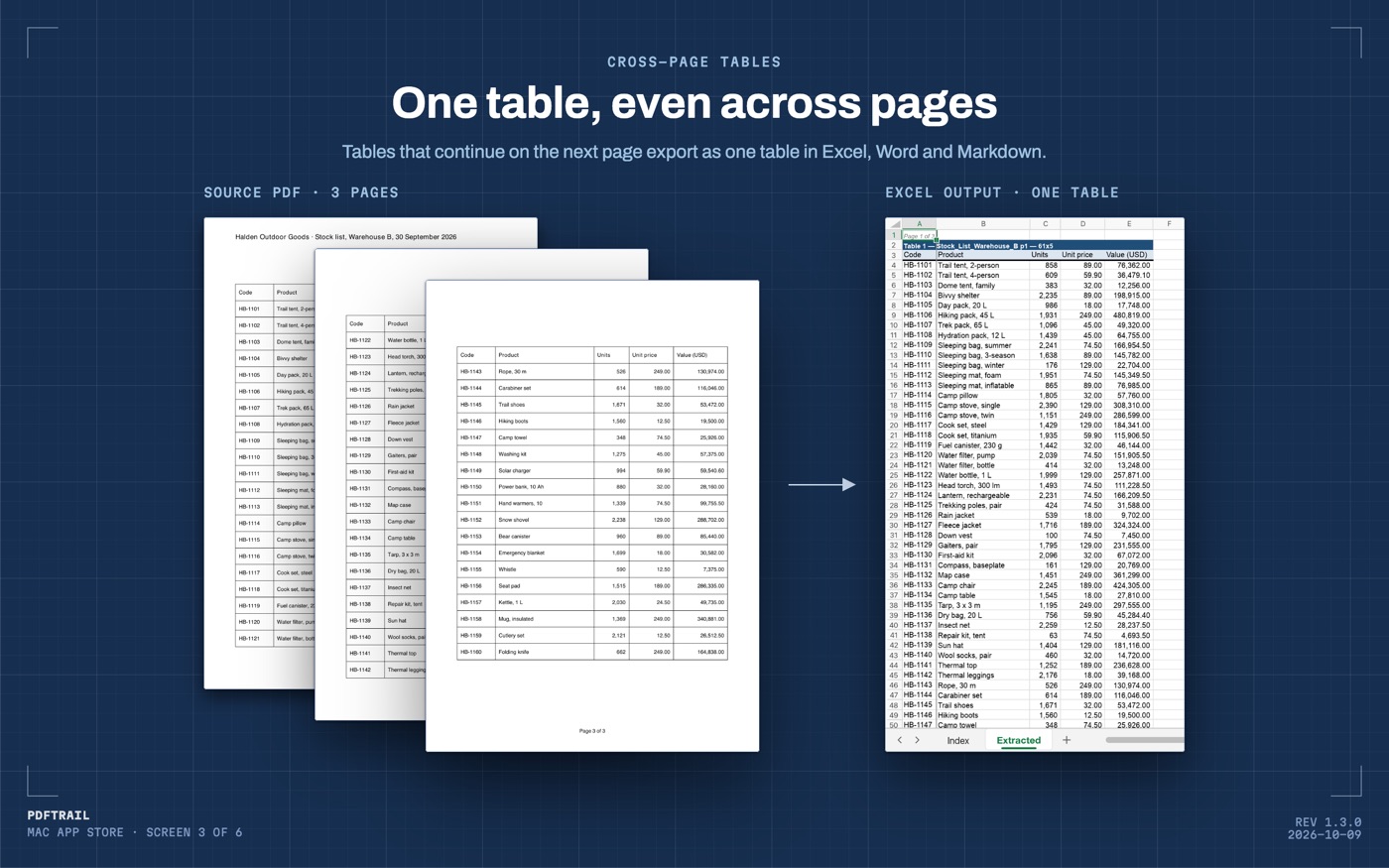
A table that runs across several PDF pages is one table in the Excel file, with one header row. PDFTrail joins the pieces, and a row cut by a page break becomes one row again. That saves as one CSV with one header row, which is the shape a script wants.
The Extracted sheet holds every table from the PDF, each with its label. If it holds more than one table, copy each one to a new sheet first. Then each CSV holds one table.
Back in the text editor
Open the CSV again once you have saved it. Scroll past the header row and read a handful of lines as plain text, commas and quotes included, before the file goes to a script or an accountant. This takes less time than it sounds, because a CSV file is short and every row is the same shape as the one above it. A row that looks a different length from its neighbours is the one worth a second look.
CSV earns its place as the format every tool can read by staying plain. That same plainness is why it deserves a look before it travels anywhere else.
The PDF to Excel guide covers the first half of this route in more detail. The ICICI statement guide works through one bank's version of the row-and-column problem. The comparison of PDF to Excel tools lines up the other routes, if you want to weigh them yourself.
A CSV file never hides anything. Read it once before you trust it.
FAQ
Can PDFTrail export a PDF straight to CSV?
No. PDFTrail exports Excel (.xlsx), Word (.docx), Markdown, JSON and plain text. For CSV, export to Excel on your Mac, then save the sheet as CSV in Excel or Numbers.
What is the difference between CSV and Excel for a PDF export?
A CSV file is plain text with commas between fields, and almost any program can read it. An Excel file keeps formatting and formulas, which a CSV does not.
Why does my CSV hold only one table?
A CSV file has no sheets, so it holds one table. Excel saves only the current worksheet as CSV, so a workbook with several sheets needs one CSV per sheet.
Will leading zeros in account numbers or codes survive in the CSV?
Only if the zero is in the Excel sheet first. A CSV file keeps the characters as they are, and the program that opens it decides whether to keep the zero. Excel's import step lets you set a column to text.
Does converting a scanned PDF to CSV need an internet connection?
No. PDFTrail runs OCR and writes the Excel file on your Mac, with no upload. Saving the sheet as CSV in Excel or Numbers also happens on your Mac.
Why does one field in my CSV have quotation marks around it?
A field gets quoted when it contains a comma of its own, often a description or an amount with a thousands separator. The quotes keep that comma from splitting the row.
Related guides
- PDF to Excel on Mac: The Complete Guide (2026)
- How to Convert a Bank Statement PDF to Excel on Mac
- SBI Bank Statement PDF to Excel on Mac
- HDFC Bank Statement PDF to Excel on Mac
- ICICI Bank Statement PDF to Excel on Mac
Get PDFTrail
PDFTrail is on the Mac App Store — download it, try it on your own file, and pay only if it earns its keep.
GET PDFTRAIL — MAC APP STORE