
Engine notes · 2026-10-15
Why PDF to Excel Gets Numbers Wrong, and How to Catch It
Open a spreadsheet that came out of a PDF and scroll down a column of amounts. Every cell lines up. Every decimal sits where it should. One number in that column is wrong, and nothing on the screen tells you which one. A bad conversion does not look bad. It looks exactly like a good one, right up until you add the column and the total is off.
The wrong number rarely comes from one glitch. It shows up at a handful of different points in the process, and each point leaves a different kind of mistake behind. Knowing where a mistake is usually born tells you where to look for it, instead of rereading the whole sheet.
Where OCR misreads a character on a scan
A scanned page is not text. It is a picture of text, and something on your Mac has to work out the letters from the shape of the ink. Most of the time that is easy. A worn photocopy, a faint fax, or a page scanned at an angle makes it harder. A few characters are close enough in shape to trade places: an 8 for a 3, a 1 for a 7, a 0 for the letter O, a 5 for an S. The reading comes back looking right and is not, and the wrong character sits in the cell looking exactly like the right one would have.
A downloaded statement, an emailed invoice, anything produced by software rather than a scanner, skips this cause completely. The text is read directly from the file, no OCR guessing, because the characters and their positions are already stored on the page. The scanned PDF to Excel guide covers what that OCR pass looks like end to end, and what a page with no usable text looks like when the engine gives up rather than guess.
Where the table structure shifts a number
Even a correctly read character can end up in the wrong place. Turning a page of positioned text into rows and columns means deciding where one row ends and the next begins, and where one column stops and its neighbour starts. Get a boundary wrong, on a tight column or across a page break, and a correct number lands one column over, or two rows fuse into one. This is not a misread digit. It is a right digit in the wrong house, and it is easy to miss, because the number itself was never wrong. Only its address was.
The mechanism behind that reconstruction, why a PDF has no table stored in it at all, is the subject of the table extraction guide. I have also written about what happens when a page is too far gone to read at all. It is the far end of the same problem, a grid built from noise instead of a real row.
Where the spreadsheet decides a number is text
The third failure point is not in the PDF. It sits in the spreadsheet, after the file has already opened correctly. A thousands separator, a currency symbol, a trailing Dr or Cr, or a negative amount shown in brackets can make a program treat a cell as text rather than a number. The digits look fine. A SUM formula run over that column quietly skips the cell, and the total comes out short by exactly that one amount, with no error on the sheet.
Microsoft's support page on numbers stored as text walks through the fix. Convert the affected cells back to numbers, or run them through a formula that forces the value out of the text. It is worth knowing this happens in any spreadsheet, built from any source, PDF or typed by hand. A converted file just hands you a whole column of these cells at once, arriving in one paste instead of one entry at a time.
The checks that take seconds
None of these failure points need a forensic pass over the sheet. A few checks catch almost all of them, and each one is quick.
- Sum the column and compare it with the printed total on the source document.
- Walk the running balance down the page, if the document has one, checking that each line still equals the one above it plus or minus that row.
- Sort the column and look at the highest and lowest values. A misread character can produce an amount that is off by a whole order of magnitude.
- Compare any number that looks odd against the source page, in Table Review, which shows both side by side.
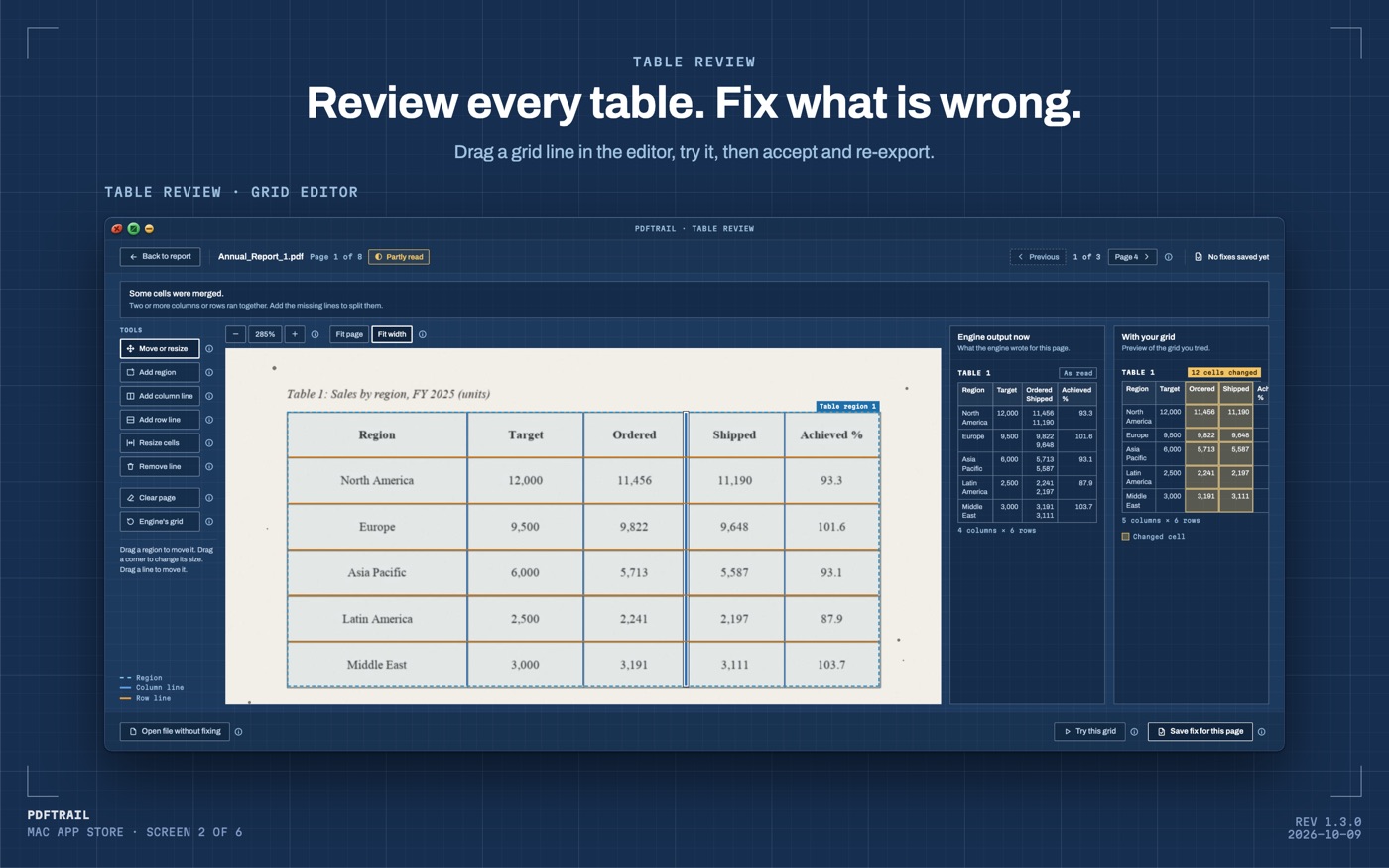
PDFTrail writes the files first. Then Table Review shows each detected table next to the scanned or downloaded page it came from, and it opens by itself when a page needs a look. Checking one odd number against the source takes a glance, not a recount of the whole column. If a table is wrong, drag the grid lines into place in the grid editor, then click Accept and re-export. PDFTrail is my app, and I built this step because I would rather you catch a wrong number in seconds than find it in a total that has already gone out the door.
Back to the column
Back to the column at the top of this page. One of those numbers is wrong. Now you know where a mistake like that is usually born: a scan an OCR pass misread, a boundary the reconstruction stepped over, or a format the spreadsheet decided was text and not a value. Two of those causes have nothing to do with scanning, and they will happen to a column typed in by hand as well.
A born-digital PDF removes the scanning cause outright, since there was never a scan to misread in the first place. The other two still deserve a look, however the file arrived on your Mac. Sum the column. It takes seconds, and it is your money sitting in that one cell.
FAQ
Why does a PDF to Excel conversion get one number wrong?
A wrong number usually starts at one of a few points, a misread character on a scan, a table boundary that shifts a number sideways, or a format Excel reads as text instead of a value.
Can Excel skip a number in a SUM formula without showing an error?
Yes. If a cell holds a number stored as text, SUM ignores it, and the total comes out short with no warning on the sheet.
Does a downloaded bank statement carry the same risk as a scanned one?
It avoids the scanning cause entirely, since the text is read straight from the file on your Mac. A table-boundary or text-formatting slip can still happen, so the check is worth doing anyway.
Where do I check a converted number against the source page?
In Table Review, which runs on your Mac after the conversion and shows each detected table next to the page it came from.
Why do brackets around an amount cause a problem after conversion?
Some spreadsheets read a bracketed amount as text rather than a negative number, so it can drop out of a sum until it is converted back to a value.
Related guides
- Why a PDF Has No Tables (and How We Find Them Anyway)
- Before and After: Teaching Our Engine to Read Bad Scans
- PDFTrail 1.2: Real Excel Tables from Scanned Pages
- Extract Tables from PDF Without Uploading: Why It Matters
- PDFTrail 1.3: One Table Across Pages and Table Review
Get PDFTrail
PDFTrail is on the Mac App Store — download it, try it on your own file, and pay only if it earns its keep.
GET PDFTRAIL — MAC APP STORE