
Field guide · 2026-10-02
Form 16 PDF to Excel on Mac for Tax Filing
A Form 16 lands in your inbox or on the company HR portal once a year: one PDF from your employer, stating exactly what you were paid and what tax was deducted from it. Before you file, you want those figures in a spreadsheet, next to your own numbers, not a certificate you take on faith.
Getting a Form 16 PDF to Excel on your own Mac is a short job once you know what the file actually is, and a slow, risky one if you guess.
Retyping the certificate into a sheet works, until a stray digit turns up three rows down, usually after you have already filed. Selecting the page in Preview and pasting it into Excel is quicker and worse. A PDF holds separate runs of text pinned to coordinates, not a table, so the paste lands as one tangled line, salary and tax deducted mixed together. Uploading the file to a converter site untangles that, at the cost of handing your PAN and a year of salary to a server you cannot name.
There is a way to get the rows out on your Mac, without sending the certificate anywhere.
What a Form 16 PDF actually contains
Form 16 is a certificate of tax deducted at source on salary, issued under section 203 of the Income Tax Act, 1961. The Income Tax Department's own portal says an employer gives one to every employee at the end of the financial year. It covers the employee's income, the deductions and exemptions claimed, and the tax deducted at source, so tax payable or refundable can be computed (incometax.gov.in).
That page does not set out a fixed page layout, and in practice there isn't one. The certificate's shape depends on the employer and on whichever payroll software produced the PDF. One company's Form 16 prints as a single page. Another spreads the salary breakup across a second sheet, in a different font, from a different system. Some list monthly salary as one total; others break it into basic pay, allowances, and perquisites across several lines. None of that changes what the certificate is for.
Yours may be born-digital: generated straight from payroll software and downloaded as a finished file. Or it may be a scan, printed, signed, and photocopied before it reached you. A file where you can select and highlight the text with your cursor is born-digital. One that behaves like a photograph, where the cursor selects nothing, is a scan. The two need different handling, and PDFTrail is my app, built around exactly that difference.
Form 16 PDF to Excel on Mac: the walkthrough
- Click "Open PDF" and choose the Form 16 PDF.
- Wait for the read. A born-digital certificate has a text layer, so PDFTrail reads it directly from the file, with the position of every character. No OCR guessing. A scan holds only pixels, and OCR handles those on the Mac before anything else happens.
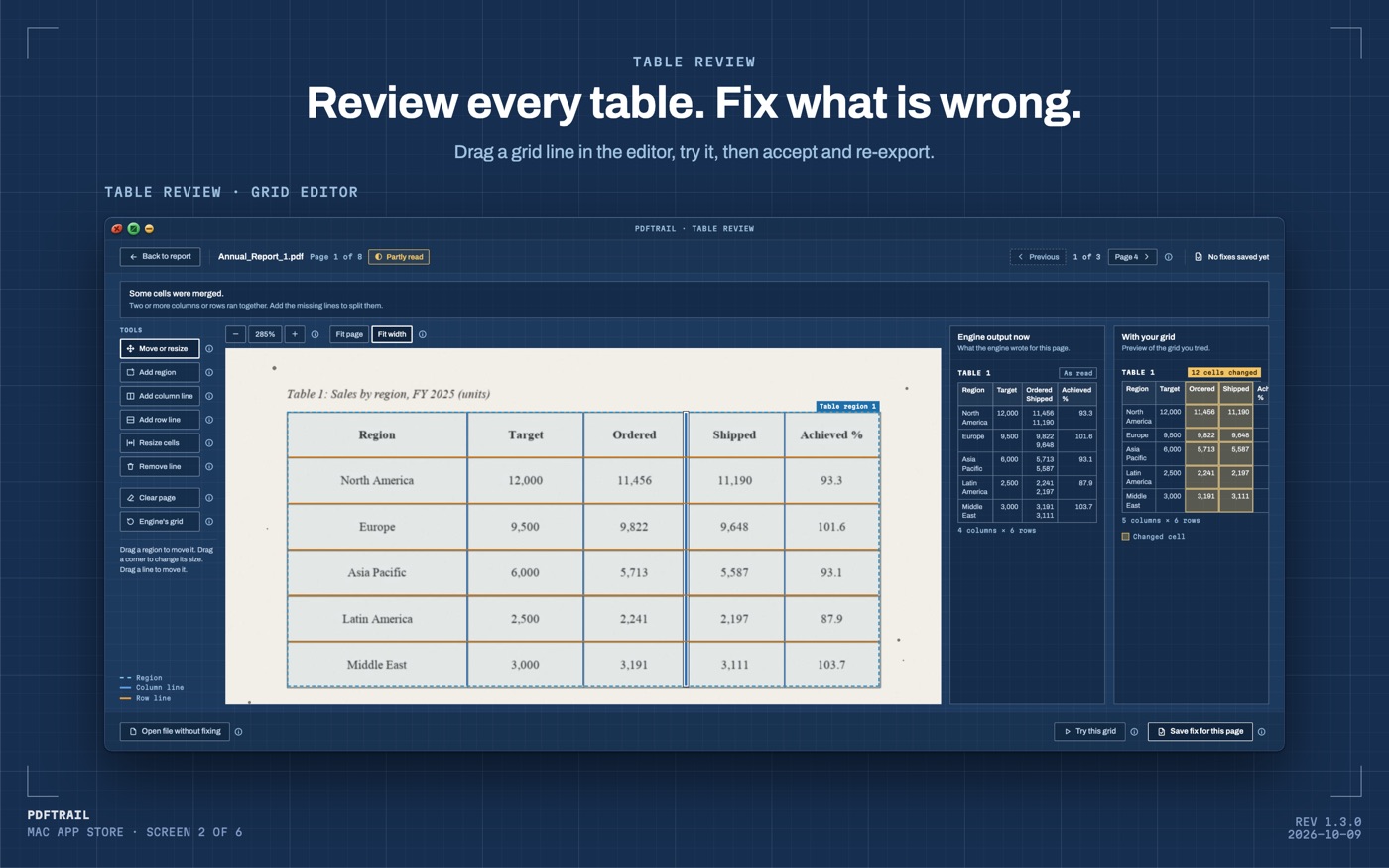
- Open Table Review and confirm income sits under income, and tax deducted sits under tax deducted, not merged into one column. Pages that need a look open it on their own; for every other page, use the "Review tables" button.
- Open the .xlsx file. To correct a wrong table, open the grid editor on its page, then choose "Accept and re-export".
If you changed jobs mid-year and have a Form 16 from each employer, choose both PDFs together in the Open dialog. Batch conversion runs them in one pass, one Excel file per certificate, and you still check each one in Table Review before you rely on it. For one workbook, turn on "Combine into one file per format"; its Index sheet shows which certificate each table came from.
Why it works
A Form 16 gives the same PDF the same treatment as any other file: nothing in it is a table. Each piece of text sits at its own coordinate, and a row is only several of those pieces lining up by eye. For a born-digital certificate, PDFTrail reads those positions directly, no OCR guessing, and works out which runs share a row and where the columns break. For a scanned certificate, it runs OCR on the Mac first, and Table Review then shows you the table it found, so you can check it before you rely on the spreadsheet.
That holds whether the page in front of you is a one-page summary or a full salary breakup spread over three. The engine does not need to know what a Form 16 is for. It only needs to know where each character sits on the page, and, for a scan, what each character looks like.
The figures worth checking before you file
Once the sheet is open, walk it against the certificate itself. Check the income figure first, since the certificate builds every other number from it. Then check the deductions and exemptions claimed against what you actually submitted. Tax deducted at source is the one that matters most: it is the figure that decides whether you owe more or get a refund.
If you kept your monthly payslips, add up the gross figures yourself and compare the total against the certificate's income line. A mismatch is worth a question to HR before you file, not after.
I would not upload this PDF to check it faster. It carries your PAN and your salary for the year, and none of that needs to leave your Mac to end up in a spreadsheet.
Back to the certificate
The certificate you got this year will look like it always does: your employer's usual system, your employer's usual format. That is normal. Trust the review screen over these paragraphs; it shows your certificate, not a description of one.
A Form 16 is not a complicated document. It is a short PDF with a handful of figures that matter more than anything else in your return.
If you are also pulling bank statements together for the same return, the HDFC guide and the SBI guide cover those PDFs. The PDF to Excel guide sits above all three as the general starting point.
Whatever else waits until later, look at the tax deducted figure now. It decides what you owe.
FAQ
Does this work with a scanned Form 16?
Yes. A scanned copy has no text layer, so PDFTrail runs OCR on your Mac. After the conversion, Table Review shows the table, so you can check it before you rely on the file.
Do I need to upload my Form 16 anywhere?
No. The conversion runs on your Mac. Nothing about your salary or PAN leaves the device.
How much does it cost?
It is free to try, with 10 free Excel exports. The full version is a $24 one-time unlock, no subscription.
What if I have a Form 16 from two employers in the same year?
Choose both PDFs together in the Open dialog and convert them in one pass, then check each file against its own certificate before you combine the figures.
Related guides
- PDF to Excel on Mac: The Complete Guide (2026)
- How to Convert a Bank Statement PDF to Excel on Mac
- SBI Bank Statement PDF to Excel on Mac
- HDFC Bank Statement PDF to Excel on Mac
- ICICI Bank Statement PDF to Excel on Mac
Get PDFTrail
PDFTrail is on the Mac App Store — download it, try it on your own file, and pay only if it earns its keep.
GET PDFTRAIL — MAC APP STORE