
Field guide · 2026-10-17
Credit Card Statement PDF to Excel on Mac
While building the engine behind PDFTrail, I once ran it over pages that held nothing but scanner noise. It reported 26 tables. There were none. That number is the reason I check a credit card statement PDF to Excel conversion page by page and not only at the end. A statement is mostly one long list of charges, usually with other pages around it, and the other pages are where a table finder can go wrong.
Start with what the file is. If you downloaded the statement from your card issuer's website, it is a born-digital PDF. It holds text, and every run of text sits at a coordinate. It holds no table. The rows you see are your eye joining runs that happen to line up. Select the page in Preview and paste it into Excel, and the columns collapse, because the pasted text has lost its positions. Excel for Mac has no PDF import to fall back on. Microsoft's table of Power Query data sources by Excel version has no PDF row on the Mac side.
Retyping works for a month with eleven charges. It stops being a plan at the second page.
Online converters need your file on their server first. A card statement lists, line by line, where you were and what you bought. I wouldn't upload that.
PDFTrail is my app. It runs on the Mac and reads positioned text straight out of the file, then rebuilds the rows from where the fragments sit. Layouts differ between card issuers and I don't have yours, so I describe the job in general terms: a list with a date, a description and an amount.
Credit card statement PDF to Excel, step by step
- Click Open PDF and pick the statement. For twelve months, select all twelve files in the same dialog.
- Tick Excel under the output formats and press Convert. The .xlsx is written straight away.
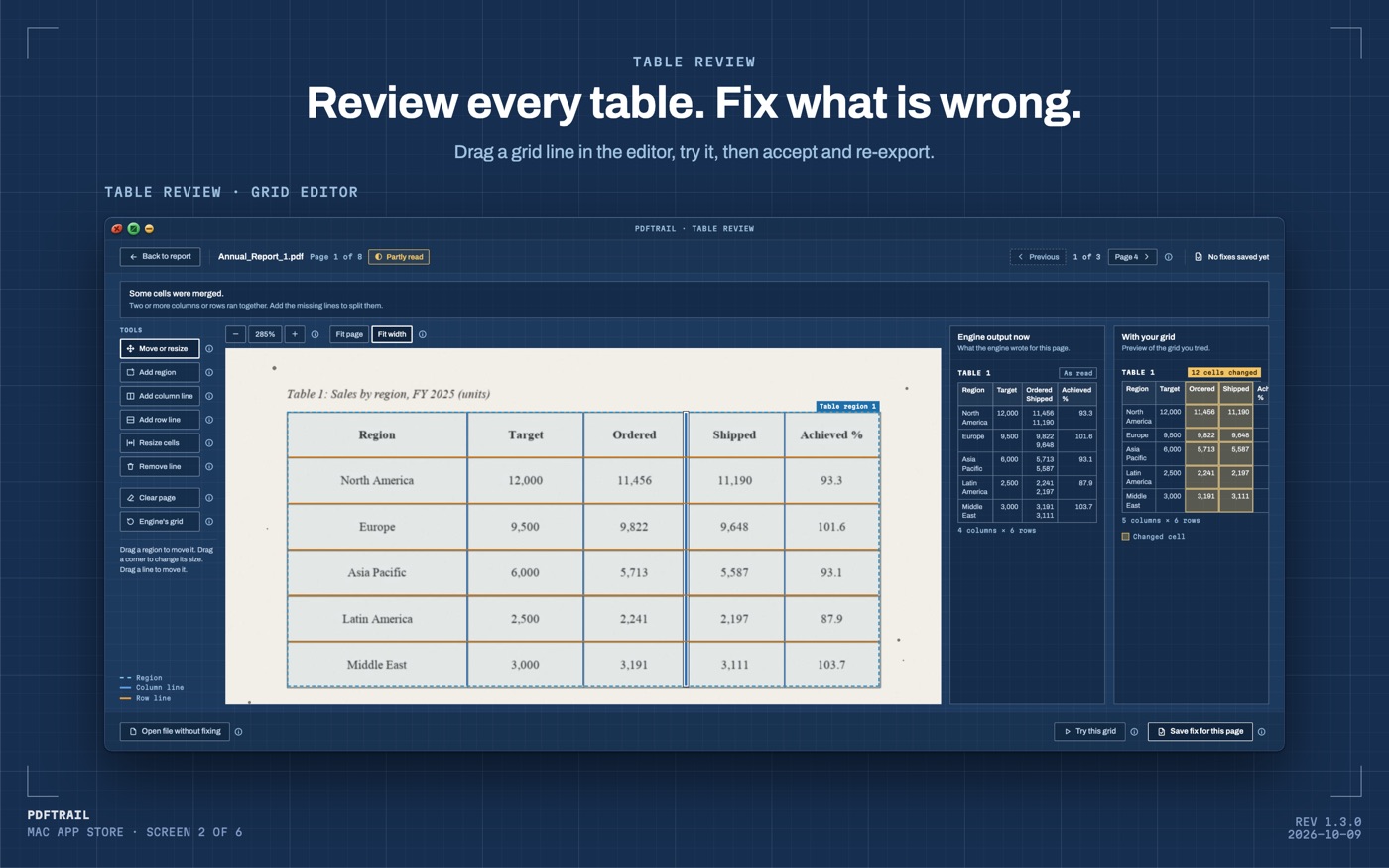
- Look at the tables once the run ends. If a page needs attention, Table Review opens on its own. Otherwise press Review tables in the toolbar.
- Where a table is off, open that page in the grid editor. Shift the lines, add a row or column line, or outline the table yourself. Try the grid, and save the fix when it looks right.
- Press Accept and re-export to write the files again. No free export credit is used.
- Open the .xlsx in Excel or Numbers.
You can also open the files as they are. I wouldn't rely on the sheet until I had looked at the tables, though. That is the habit the 26 invented tables taught me.
Why a long statement stays in one piece
A statement with many charges runs over several pages. Version 1.3.0 handles that case. A table that carries on over the page break is stitched into a single table, with one header row at the top. If the break fell through the middle of a row, that row is whole again.
This matters more for a card statement than for most files, because the part you want is the list, and the list is the part that crosses pages.
Here is the mechanism, in order. The PDF stores each run of text with its position. PDFTrail looks at that geometry to see which fragments share a row and where the column boundaries fall, page after page. Where a table carries on, it joins the pieces. At no point does it guess at a letter, because the letters were already in the file. Nothing in that chain is OCR, which is why a downloaded statement is the easy case.
A scanned statement is the harder case. The page holds pixels, not letters, so OCR runs on the Mac first. OCR is good but not infallible, and that is the reason Table Review exists.
What I check in the rows
Count the charges on the last page of the statement and compare them with the last rows of the sheet. A page break is the likeliest place for a row to go missing, so that is where I look first.
Then look at refunds and payments. On a card, those are the rows where a sign or a column decides what the number means. Check that each one landed where the page shows it. A refund that reads as a charge changes your total by twice its value, and the sheet will not tell you.
Next, look at the dates. Read the first and last rows of each page against the page itself. A date in the wrong column is easy to miss when you scan down a sheet, and easy to see when the page is next to it.
If the statement prints a total for the charges, add up the amount column and compare. If it prints a previous balance, the new charges, the payments and a new balance, check that your rows reproduce them. I can't promise your issuer prints those figures. Where it does, the arithmetic tells you whether a digit went wrong.
Look at the pages that are not a list as well. Notices and small print are not tables. If Table Review shows a table on one of them, ask what it is. If a page full of charges shows no table at all, ask that louder.
Back to the noise
Those 26 tables are zero now. A fabricated table is worse than a missed one, because a missed table shows up as a gap you can see, and a fabricated one hides inside rows that look right.
Your statement is not scanner noise. It is an ordinary list of charges, and it should take six steps and a careful look. If you also keep bank statements, the bank statement guide covers that case. For the general route, see the PDF to Excel guide.
Add up the charges yourself once. The total is the number you will argue about.
FAQ
Does this work with a scanned credit card statement?
Yes. A scanned page has no text layer, so PDFTrail runs OCR on your Mac. OCR is good but not infallible, so check the tables in Table Review after conversion.
Can I convert twelve months of statements in one go?
Yes. Click Open PDF, select all twelve files in the Open dialog, and every PDF in the queue converts in one run.
How much does it cost?
It is free to try, with 10 free Excel exports. After those, Excel export still works but keeps the first 15 rows of each table. The full version is a $24 one-time unlock, no subscription.
Do I need an internet connection?
No. Everything runs on your Mac. Nothing is uploaded, and there is no account.
What if the sheet is missing a row?
Open Table Review, find that page, and compare the table with the page beside it. Fix the grid lines in the grid editor, save the fix, and re-export.
Related guides
- PDF to Excel on Mac: The Complete Guide (2026)
- How to Convert a Bank Statement PDF to Excel on Mac
- SBI Bank Statement PDF to Excel on Mac
- HDFC Bank Statement PDF to Excel on Mac
- ICICI Bank Statement PDF to Excel on Mac
Get PDFTrail
PDFTrail is on the Mac App Store — download it, try it on your own file, and pay only if it earns its keep.
GET PDFTRAIL — MAC APP STORE