
Engine notes · 2026-10-21
Born-Digital vs Scanned PDFs: Why It Changes Everything
Early in the engine's life, I ran it on a set of scanned pages that held nothing but scanner noise. It found 26 tables. The noise had lined up, in places, into something shaped like rows and columns, and the engine took the shape for the real thing. Those 26 are zero now, and the rule that came out of them is that a fabricated table is worse than a missed one.
A born-digital page has no noise to mistake for a table. That is the born digital PDF vs scanned difference in one story, and it sits underneath everything else a converter does.
Born digital PDF vs scanned: what each file stores
A born-digital PDF is written by software. A bank's statement system writes one. So does an accounting program, or a word processor's Save as PDF. The file holds the text itself, each run of characters pinned to coordinates on the page. A table does not exist in it, but its evidence does: fragments that sit on one baseline, and columns where the left edges line up. PDFTrail reads that text directly from the file, with the position of every character. Nothing is guessed, because nothing is hidden in a picture.
A scanned PDF holds a photograph of a page. The pixels carry no letters. Something has to decide where the letters are and which letters they are, and that something is OCR. It is good. It is not infallible, and its mistakes look like clean text.
Tabula's own home page states the dividing line plainly: Tabula only works on text-based PDFs, not scanned documents. I agree with the line. A tool that expects text has nothing to read on a page of pixels.
What changes when the page is pixels
Four things change, in this order.
The characters stop being known and start being chosen. A 3 and an 8 are a text-layer fact in one file and an OCR judgment in the other.
Table evidence changes with them. In a text layer, aligned fragments are evidence of a table. In a scan, aligned specks are also evidence of one, and some of them are noise. That was my 26.
A scan adds a way to fail. It can invent something, and an invented table looks exactly like a real one in Excel. I told the longer version in teaching the engine to read bad scans.
And so the amount of checking changes. You still check the structure of a born-digital table. On a scan you also check the digits against the page.
How to tell which one you have
Ask where the file came from. A statement you downloaded from a bank's website, an invoice that arrived from an accounting system, and a report from a company's site are usually born digital. A photocopy, a fax, and a phone photo saved as PDF are scans.
The test of searching for a word is not final. Some scanners add a hidden text layer to the image so the page is searchable. That layer comes from OCR, so it can be wrong in the same ways. PDFTrail checks that hidden layer and reads the page again when its own reading is better.
A file can also be mixed. A report may be born digital except for one pasted image of a signed page. PDFTrail also runs OCR on images inside an otherwise born-digital PDF.
If you have a choice, take the born-digital file. A statement you can download again beats a scan of its printout, because the download holds the characters and the scan holds a picture of them. That is my one firm opinion in this post.
If you cannot tell, you do not have to settle it first.
- Click Open PDF in PDFTrail and choose the file.
- Convert. A page with a text layer is read directly. A page without one gets OCR on your Mac.
- Open Table Review from the Review tables button in the toolbar, or wait for it to open by itself when a page needs a look.
- On a scanned page, read the digits against the page beside the table.
- A wrong table gets fixed in the grid editor, and Accept and re-export then writes the corrected files.
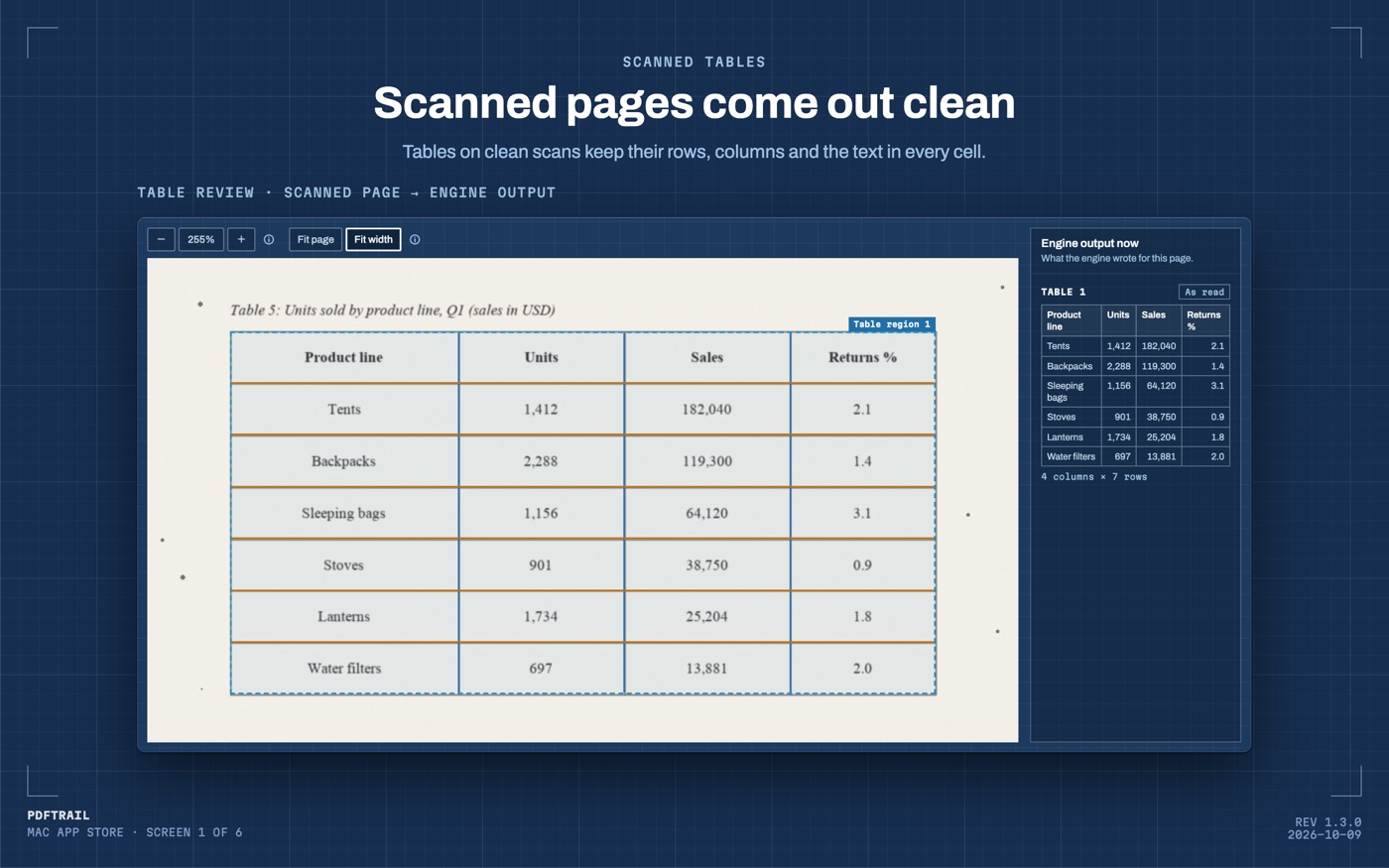
PDFTrail is my app, and the figure shows why step 4 works: the page you scanned sits beside the table the engine wrote, so you do not have to trust either one alone.
What 1.3.0 changed for scans
Scans got more attention in 1.3.0. PDFTrail now gives cleaner text from scanned pages (more words kept, repeated words dropped). It opens fax-compressed PDF pages. It reads downloaded circulars that stack two copies of each page under a watermark. None of this makes a scan into a born-digital file. A scan is still pixels. These changes make the reading of those pixels cleaner.
I can't tell you how clean a given scan will come out. It depends on the paper, the scanner, and what happened to the page on the way. Layouts and print quality vary, and I don't have your file.
Back to the 26
The engine now finds no table on a page of pure noise, and that is the right answer. A born-digital page has no scanner noise to misread, since its text was always text.
If you want the wider map, why a PDF has no tables covers how a table is rebuilt, and the scanned PDF to Excel guide covers the scan route in full.
Ask where the file came from before you ask what the converter can do.
FAQ
How can I tell whether a PDF is scanned or born digital?
Start with where it came from. A statement downloaded from a bank site was made by software. A photocopy, a fax or a phone photo saved as PDF is a scan. Some scanners add a hidden text layer, so a searchable file can still be a scan.
Does PDFTrail need to know which kind I have?
No. Open the PDF and convert it. Where a page has a text layer, PDFTrail reads the text directly. Where it has none, PDFTrail runs OCR on your Mac.
Can one PDF be both?
Yes. A born-digital PDF can hold an image, such as a pasted scan. PDFTrail also runs OCR on images inside an otherwise born-digital PDF.
Why do scanned tables need a closer look?
OCR reads pixels and chooses letters, so it can choose wrong. A text layer already holds the characters. In both cases, Table Review shows each table next to its page so you can check the structure.
Is anything uploaded when PDFTrail reads a scan?
No. Both kinds are read on your Mac. Nothing is uploaded, and no account or internet connection is needed to convert.
Related guides
- Why a PDF Has No Tables (and How We Find Them Anyway)
- Before and After: Teaching Our Engine to Read Bad Scans
- PDFTrail 1.2: Real Excel Tables from Scanned Pages
- Extract Tables from PDF Without Uploading: Why It Matters
- PDFTrail 1.3: One Table Across Pages and Table Review
Get PDFTrail
PDFTrail is on the Mac App Store — download it, try it on your own file, and pay only if it earns its keep.
GET PDFTRAIL — MAC APP STORE