
Field guide · 2026-10-20
Multi-Year Financials from Annual Report PDFs
PDFTrail exists because I wanted Indian annual reports in a form a language model could read for fundamental analysis, and I would not upload them to get there. One report answers one narrow question: what happened this year. The questions worth asking sit across reports, in how a line moved over time. Annual report data extraction for a five-year series is a different job from converting one file.
It helps that every report already holds more than one year. Each one typically prints the year it covers next to the year before. Line up five reports and you hold six years, with four of them printed twice. That overlap is the useful part. Where the two copies of a year agree, you have a cross-check for free. Where they differ, the company restated the figure, or one of your extracted numbers is wrong. Both are worth knowing.
The PDFs make this harder than it sounds. A PDF holds no tables. Inside the file, the text is a scatter of fragments with coordinates, and the rows you see come from alignment. Copy a balance sheet out of Preview and the year columns lose their structure. A statement that runs onto a second page is worse, because the second half arrives as a separate pile of fragments on another page.
So the job splits in two. The first half is rebuilding each table from the positions of its text, once per report. A program can do that. The second half is matching rows across reports, and that is a judgment I keep for myself.
Annual report data extraction, one run for every year
PDFTrail is my app, and it does the first half. A report from the company's own site is usually a born-digital PDF, so the text is read directly from the file, with the position of every character. No OCR guessing. A scanned older report gets OCR on the Mac instead.
- Click Open PDF. In the Open dialog, choose every report you want, all at once. To convert a whole folder, open it in the dialog and select all the PDFs in it.
- Convert. Every PDF in the queue converts in one run. Once the first file is open, the same button reads Add PDFs and takes more.
- PDFTrail writes the export files first. Then check the tables report by report. A page that needs a look brings up Table Review on its own, and the Review tables button in the toolbar opens it whenever you choose.
- Set each table beside its page. On a balance sheet, confirm which column belongs to which year.
- If a table is wrong, open the grid editor on that page. Drag the grid lines into place, add column or row lines, or draw a table region. Try the new grid, then save the fix.
- Last, Accept and re-export rewrites the files with your fixes, at no cost in free export credits.
- Open the Excel files and build the series.
Fixes are saved for that PDF and apply again the next time you convert it, so you do not repair the same page twice.
Why a split statement stays in one piece
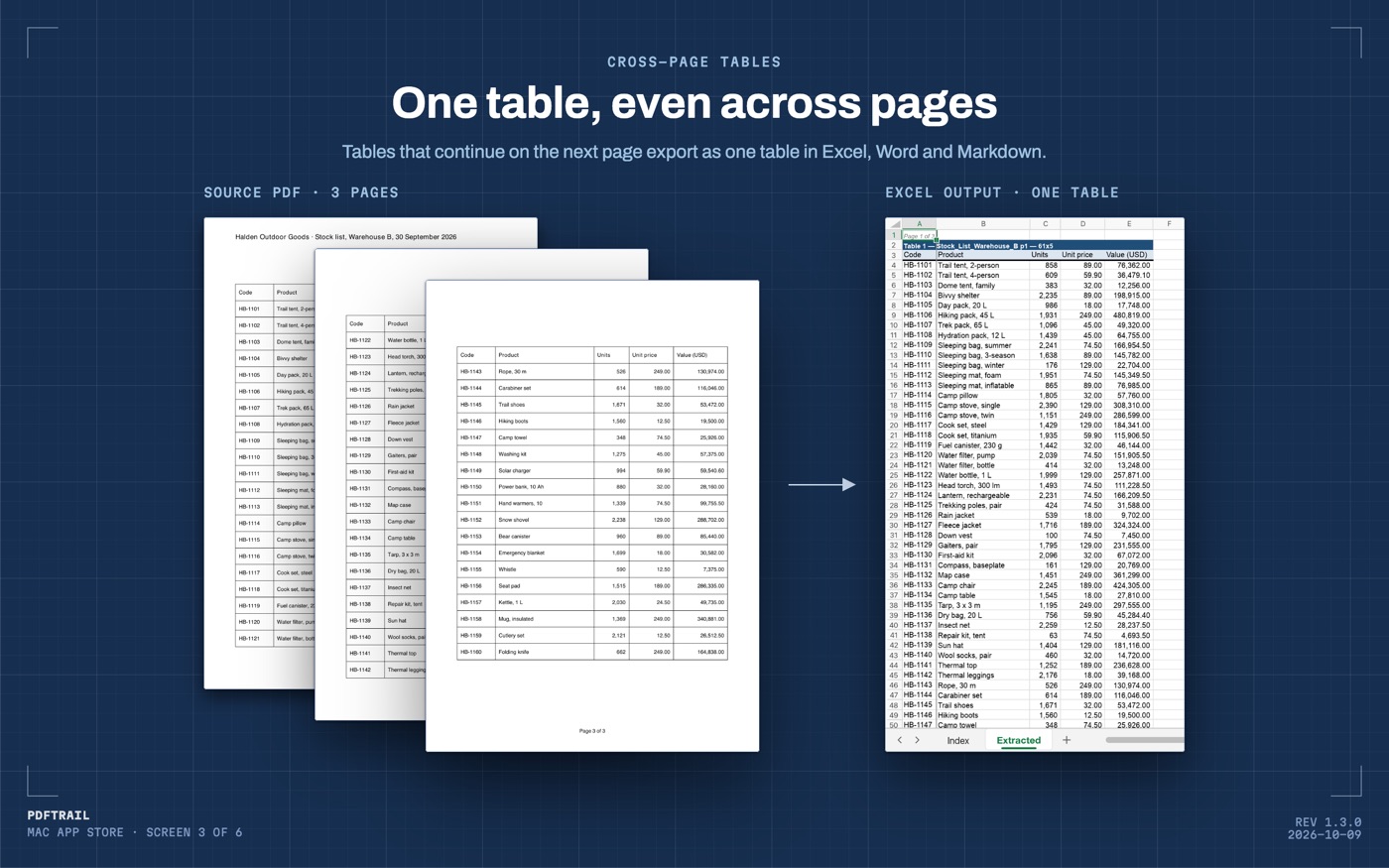
A balance sheet in a long report often breaks across a page. When a table continues on the next page, PDFTrail joins the pieces into one table in Excel, Word and Markdown, with one header row. A row cut by the page break becomes one row again.
That matters for a series. A split statement is a quiet way to lose a line, because the heading sits on one page, the total on the next, and nothing in the file says they belong together. You find the gap later, when the column will not add up.
Lining up the years in Excel
Open the files and build one sheet by hand: one row per line item, one column per year. Start with the main statements. The SEC's beginners' guide to financial statements names the usual set: balance sheet, income statement and cash flow statement. It adds that the footnotes are "packed with information." An Indian report calls the income statement the statement of profit and loss. A segment or borrowing figure usually sits in a note, not on the face of a statement, so pull the notes you track as well.
Three habits keep the sheet honest.
Take each year's figure from the report that printed it last, because that copy carries any restatement. Keep the earlier figure in a second column so the change stays visible.
Watch for renamed lines. A heading that gains a word between years defeats a lookup by name, and no formula will warn you.
Compare the overlap. For every year printed twice, subtract one copy from the other. A difference has three possible causes: a restatement, a misread cell, or a column that slipped. Table Review settles the last two in a minute. Open the page, put the cell beside the print, and read both.
I can't tell you how your company lays out its notes, because layouts change by company and by year, and I don't have your files. If the next stop is a language model instead of a spreadsheet, the same reports convert to Markdown. PDF to Markdown on Mac covers that route.
Back to the folder
The reports I read stay on my Mac, and every series I build from them comes from files that never left it. The annual report PDF to Excel guide covers the single-report case in more detail. For the balance sheet on its own, see extracting balance sheet tables.
Where two reports print the same year, look at both numbers before you trust either.
FAQ
Can I convert five years of annual reports in one run?
Yes. Choose all the PDFs at once in the Open dialog and every file in the queue converts in one run on your Mac. The queue has no fixed limit.
Does PDFTrail match the same line item across years for me?
No. It rebuilds each table from the page it came from. Deciding that two lines in two reports are the same line is a judgment, and you make it in Excel.
What about an older report that was scanned?
A scanned page has no text layer, so PDFTrail runs OCR on your Mac. OCR is good but not infallible, so check those tables in Table Review before you rely on the file.
What does it cost?
It is free to try, with 10 free exports each for Excel, Word and Markdown. After the 10 free Excel exports, Excel export keeps the first 15 rows of each table. The full version is $24 one-time, with no subscription.
Do I need an internet connection to convert the reports?
No. Conversion runs on your Mac. Nothing is uploaded, and there is no account or sign-up.
Related guides
- Annual Report PDF to Excel: A Guide for Investors
- Extract Balance Sheet Tables from an Annual Report PDF
- Quarterly Results PDF to Excel: NSE/BSE Filings on Mac
Get PDFTrail
PDFTrail is on the Mac App Store — download it, try it on your own file, and pay only if it earns its keep.
GET PDFTRAIL — MAC APP STORE